

Introduction
The Advanced Integrated Visibility Tracking Number Subscription API enables Advanced Integrated Visibility subscribers to associate tracking numbers with a webhook project using API endpoints. The Tracking Number Association capability supports two processing methods:
- Tracking Number Association – Synchronous returns the processing results within the same HTTP response. This option is best suited for applications that require immediate confirmation when associating a smaller number of tracking numbers.
- Tracking Number Association – Asynchronous submits the request for background processing and returns a job ID that can be used to retrieve the processing status and results later. This option is best suited for processing larger batches of tracking numbers.
Choose the processing method that best meets your application's performance and workload requirements.
Note:
- You must have admin or contributor access for your Advanced Integrated Visibility project
- For more information on Advanced Integrated Visibility and its features, visit the Advanced Integrated Visibility documentation page.
Benefits
The Advanced Integrated Visibility Tracking Number Subscription API provides the following benefits:
- You can easily associate, update, and manage tracking numbers for your Advanced Integrated Visibility webhook project using the API endpoints.
- Associate multiple tracking numbers in a single API request instead of processing each tracking number individually.
- Choose between synchronous processing for immediate results or asynchronous processing for larger batch operations.
How Tracking Number Subscription Works
Use the following endpoints to manage your Advanced Integrated Visibility project:
- Tracking Number Association – Synchronous: allows you to associate tracking numbers with a webhook and receive the final processing status within the same HTTP response.
- Tracking Number Association – Asynchronous: allows you to associate tracking numbers with a webhook and use the returned
jobIdlater to check the status of the asynchronous job or download details using related endpoints:- Tracking Number Job Status
- Tracking Number Job Details
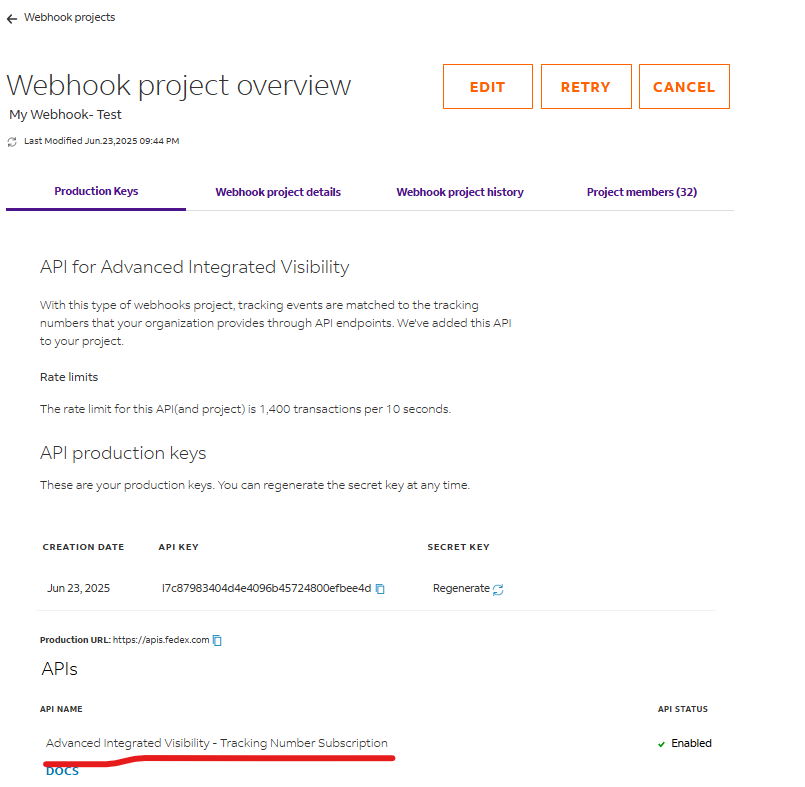
These APIs are available from your Advanced Integrated Visibility project overview.
These APIs can be accessed only through your project overview as depicted in above screenshot.
Choosing a processing method
The following table summarizes the differences between the synchronous and asynchronous Tracking Number Association endpoints.
| FEATURE | SYNCHRONOUS | ASYNCHRONOUS |
|---|---|---|
Maximum tracking numbers |
Up to 150 per request |
Up to 1,000 per request |
Response |
Returns the processing results for each tracking number in the same HTTP response |
Returns a job ID that can be used to retrieve processing status and results later |
Timeout |
30-second request timeout |
Not applicable |
Error handling |
Returns validation and processing errors in the same response |
Check the job status and job details endpoints for processing results |
Recommendation
Use the synchronous endpoint when you need immediate confirmation for smaller batches of tracking numbers. Use the asynchronous endpoint when processing larger batches that do not require an immediate response.
Tracking Number Association - Synchronous
Use this endpoint to associate one or more tracking numbers with an Advanced Integrated Visibility webhook project and receive the processing results within the same HTTP response.
This endpoint is intended for applications that require immediate confirmation and supports requests containing up to 150 tracking numbers.
Required input:
subscriptionIDtrackingNumber
Benefits
The synchronous endpoint provides the following benefits:
- Immediate processing results
- Detailed success and failure information in a single response
- Support for up to 150 tracking numbers per request
- Request validation and business rule enforcement before processing
- Machine-readable error codes and descriptive error messages
- Transaction IDs for request tracing and troubleshooting
Validation and error processing
The Tracking Number Association – Synchronous endpoint enforces multiple validation rules, including:
- Requiring a valid and active
subscriptionId - Allowing only one
subscriptionIdper request - Requiring a
trackingNumber - Ensuring that tracking numbers meet FedEx formatting requirements, including the maximum tracking number limit of 6 to 22 digits
Error responses follow a consistent structure with errors[] containing code and message for easy parsing.
"errors": [
{
"code": "ERROR.CODE",
"message": "Descriptive error message"
}
The Transaction Number Association – Synchronous endpoint allows for partial successes. When some tracking numbers fail, the Synchronous API still returns 200 OK and shows the following:
failedTrackingNumbers- A descriptive message
{
"transactionId":
"xxxxxxxxxxxxxxxxxxxxxxxxxxxxxxxxxxxx",
"output": {
"failedTrackingNumbers":
[ "XXXXX",
" YYYYY"
],
"message": "Below tracking numbers failed to upload due to validation or system errors"
}
}
See the business rules sections for additional details and rules.
Tracking Number Association - Asynchronous
Use this endpoint to submit one or more subscribed tracking numbers for background processing.
The request returns a job ID that you can use with the Tracking Number Job Status endpoint to monitor processing and with the Tracking Number Job Details endpoint to download processing results after the job completes.
Required input:
- Action
- Tracking number Details
You can associate up to 1,000 tracking numbers in a single request.
Benefits
The asynchronous endpoint provides the following benefits:
- Supports large batch submissions of up to 1,000 tracking numbers
- Allows long-running requests to be processed in the background
- Enables job status monitoring and downloadable processing reports
- Eliminates request timeout concerns for large workloads
Tracking Number Job Status
Use this endpoint to get the status of an asynchronous job (one or more consecutive requests in queue) or status of all the jobs submitted.
The required input information for this request is:
jobID– Specify the job ID for which you intend to retrieve status.
Note: Job ID is an optional input for this endpoint. If you do not specify the job ID, then you will get the status of all the submitted jobs.
The successful response for this request will return the jobID, current job status, and job creation and job completion timestamp. The response will show the current status of the jobs. In addition, the response will also contain success messages, errors, or warnings for users to view and troubleshoot them as applicable.
- If the job status is displayed as COMPLETED, it means that all the tracking numbers have been validated and processed successfully.
- The COMPLETED status implies the tracking numbers are validated and processed successfully. It does not imply that all the tracking numbers have been successfully added to the Advanced Integrated Visibility project.
- For jobs with multiple tracking numbers, status can be considered COMPLETED even if some numbers fail to associate with the project and others succeed. To confirm the status of each tracking number in the original association request, download the batch report.
Note: If the job status is displayed as FAILED, it implies that due to various reasons/hard failures, the request could not be processed, and the user must retry it again.
The following table shows the job statuses and their respective descriptions:
| JOB STATUS | DESCRIPTION |
|---|---|
SUBMITTED |
Job is submitted to the system after all basic validations, it will be processed asynchronously. |
ACCEPTED |
Job is accepted and it will be queued. |
UNACCEPTED |
Job is unaccepted due to internal failure or system unavailability, need to be retried by user. |
QUEUED |
Job is queued to be processed and the processing will start any time. |
INPROGRESS |
Job has been started and it is in-progress state. |
COMPLETED |
Job has been completed and import report or export file is available for user to download. |
FAILED |
Job has failed due to various reasons and must be tried again by user. |
Tracking Number Job Details
Use this endpoint to download JSON report for an asynchronous job that is in COMPLETED status.
The required input information associated with this request is:
jobID– Specify the job ID for which you intend to retrieve status. A job ID is mandatory for this endpoint.
Note:
- You can only download one asynchronous job report at a time.
- If the job is not COMPLETED and you try to download the report, then an error message is displayed.
The successful response for this request provides you the report of the job in JSON format.
Business Rules
Common Business Rules
- There is no limit to the total number of tracking numbers that can be associated with an Advanced Integrated Visibility project.
- Tracking numbers associated with an Advanced Integrated Visibility project are dissociated 40 days after they are successfully associated with the webhook.
- Secure tracking information, such as recipient address, recipient signature, and sensitive delivery information, is not available through the Tracking Number Subscription API.
Business Rules for the Synchronous Endpoint
- Maximum of 150 tracking numbers per request.
- All tracking numbers must use the same subscriptionId.
- The specified Advanced Integrated Visibility webhook subscription must be valid and active.
- Requests are subject to a 30-second timeout.
Business Rules for the Asynchronous Endpoint
- Maximum of 1,000 tracking numbers per request.
- Job status and job details for an asynchronous request are retained for 90 days after the tracking numbers are successfully associated with the Advanced Integrated Visibility webhook.
