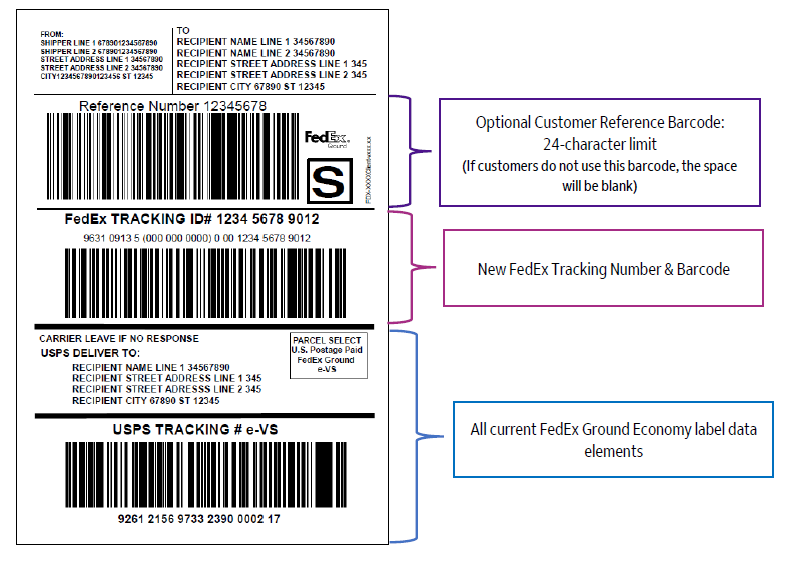
FedEx Ground® Economy Service Options
The different service options for FedEx Ground® Economy based on package weight and dimensions:
| Service Option |
Minimum Weight
|
Maximum Weight
|
Dimensions
|
Parcel Select Lightweight
|
0.01 Pounds
|
< 1 Pound
|
Sum of length plus girth cannot exceed 84″
Minimum: 6″ (L) x 4″ (W) x 1″ (H)
|
Bound Printed Matter
|
0.01 Pounds
|
15 Pounds
|
Sum of length plus girth cannot exceed 84″
Minimum: 6″ (L) x 4″ (W) x 1″ (H)
|
Media
|
0.01 Pounds
|
70 Pounds
|
Sum of length plus girth cannot exceed 84″
Minimum: 6″ (L) x 4″ (W) x 1″ (H)
|
Parcel Select
|
1 Pound
|
70 Pounds
|
Sum of length plus girth cannot exceed 130″
Minimum: 6″ (L) x 4″ (W) x 1″ (H)
|
FedEx Ground® Economy Returns
|
0.01 Pounds
|
70 Pounds
|
Sum of length plus girth cannot exceed 130″
Minimum: 6″ (L) x 4″ (W) x 1″ (H)
|
Exceptions
The following are not available for FedEx Ground® Economy:
- Collect on delivery
- Money-back guarantee
- Declared value
- Signature Proof of Delivery
- Evening or appointment delivery
- Hazardous materials service
FedEx is introducing new unauthorized surcharges for packages that exceed the maximum allowed dimensions. Two new charges will apply to international and intra-country express parcel or express freight units that exceed maximum dimension or weight limits of our network. Additional information provided in your local ‘Service Guide’.
This surcharge supports more efficient handling of oversized packages within the FedEx network and helps offset the additional handling costs associated with larger-than-limit shipments. It applies where a package exceeds the dimension restrictions for the destination country, with each country setting its own limits. Charges are assessed on a per-package basis.
Refer to the following sections for more details on available special services:
Alcohol Shipment
FedEx alcohol shipping requirements apply to wine, liquor, and beer. Each type is listed separately when regulations differ by beverage type. Wine is the only alcohol type that can be shipped directly to consumers, depending on selected shipping service. Alcohol may be Express Dangerous Goods (DG), depending on the percentage of alcohol per volume.
Who Can Ship?
- Individuals cannot ship alcohol via FedEx.
- Businesses that hold licenses (licensees) and are enrolled in the FedEx alcohol shipping program can ship to individuals in select states or to licensees in other states or countries.
- Some states have strict regulations for shipping wine to consumers, and some do not allow it.
International Regulations
- Individual country laws govern international alcohol shipping. Customers must comply with origin and destination countries' laws and regulations.
- FedEx does not accept international Ground shipments containing alcohol.
FedEx Authenticated Delivery
Shippers can use the FedEx Authenticated Delivery special service to help protect high value, sensitive shipments from fraud, misdelivery, and theft. FedEx Authenticated Delivery adds a step that requires digital recipient authentication using a unique QR code, ensuring that the package is released only to the intended recipient.
Available for FedEx Express® shipments in the U.S. and Canada, FedEx Authenticated Delivery gives shippers greater control at the final moment of delivery, helping reduce disputes and increase confidence for both senders and recipients.
To specify that a shipment requires the FedEx Authenticated Delivery special service, use shipmentSpecialServices.specialServiceType and specify FEDEX_AUTHENTICATED_DELIVERY.
When using FedEx Authenticated Delivery, a recipient email address is required. Use emailNotificationDetail.emailNotificationRecipients to provide contact information. Ensure that emailNotificationRecipientType = RECIPIENT and a valid emailAddress value is provided. Because FedEx Authenticated Delivery requires that recipients receive an HTML email to display the QR code, a notificationFormatType of TEXT is overridden.
Limitations and considerations:
- FedEx Authenticated Delivery is not available for FedEx Ground shipments.
- No delivery signature services may be paired with FedEx Authenticated Delivery. You may select FedEx Authenticated Delivery or a signature service, but not both.
- FedEx Authenticated Delivery is not available with Hold at Location.
- FedEx Authenticated Delivery is not available for shipments of alcohol, firearms, or dangerous/hazardous goods.
- FedEx Authenticated Delivery is not available for pharmacy delivery where a signature is required.
- The QR code is valid for 45 days. During that time, the shipper and recipient can contact Customer Service to re-send another email with the QR code.
- After the QR code expires, the shipment is returned to the shipper.
- Tracking shipments with FedEx Authenticated Delivery is not supported using the FedEx Track API. Developers can use FedEx Advanced Integrated Visibility account number based subscriptions to track these packages. Recipients and shippers can view these shipments through an authenticated FedEx.com experience.
For U.S. domestic shipments, surcharges for FedEx Authenticated Delivery are based on package count. For international shipments, surcharges are per-shipment. For more information, see Rate and Surcharges in the API Reference.
Monitoring and Intervention (MI) and Healthcare Identifiers (HCID)
Monitoring and intervention (MI) and HealthCare Identifier (HCID) special service options help proactively monitor critical healthcare shipments, mitigate risk, and provide intervention support to protect healthcare shipments. The HCID special services identifies time sensitive healthcare shipments and facilitates their prioritization in the FedEx network. Integration with MI provides close monitoring of HCID shipments to allow you to track your package in real time.
Note:
- This is an add-on service, you must contact your FedEx customer representative to enable it for your account.
- To select the MI and HCID services for the shipments, an account must be enabled with the healthcare feature.
- To select the non-healthcare service options such as Aerospace or Automotive Critical, the EAN must be enabled for each individual option.
- Healthcare Options are only valid for Express Premium Services. You must choose M&I special service option first to ship these health care options.
- Certain surcharges are also applicable for these special service types.
To know about the available MI and HCID service options, refer to the MI and HCID options table. The chosen MI and HCID codes will be printed on the shipping labels.
Note:
- While shipments can contain multiple healthcare identifiers, labels only display a single HCID. If multiple identifiers are included in a shipment, labels display the identifier that is highest on the HCID options list.
- The Temperature Controlled identifier (HCT - TEMPERATURE_CONTROLLED) requires the selection of a temperature range identifier. Only a single temperature can be selected for a shipment. If a shipment is created with more than one temperature-related HCID, it will result in an error.
Dangerous Goods
Shipments with dangerous goods must be tendered to FedEx Express in accordance with current International Air Transport Association (IATA) regulations for air transport and the FedEx Express Terms and Conditions. This is required regardless of the routing and whether the shipment ends up physically moving by air transportation, ground transportation or a combination of these. For added confidence, use a FedEx® DG Ready solution to generate your dangerous goods declaration. [Service ENUM : DANGEROUS_GOODS]
Division 1.3 Explosives
FedEx Express does not transport Division 1.3 explosives. Division 1.3 explosives are prohibited for all FedEx Express® services.
Dry ice
You can ship packages containing dry ice, as long as the specifics for the dry ice shipment are included in the shipping transaction. Dry ice is considered a Dangerous Goods material. [Service ENUM : DRY_ICE]
Note:
- Dry Ice is a package-level special service for domestic and international shipments.
- Dry Ice must be declared at both shipment and package level for International MPS shipments to print the compliance statement on Airway Bill labels. Example: Dry Ice, UN1845 1x2.00 KG.
- The dry Ice special service is not allowed for document shipments.
- FedEx Packaging is not allowed.
Radioactive materials
Within the U.S., Highway Route Controlled Quantity or Fissile Class III radioactive materials will not be accepted for carriage without advance arrangements.
Cargo Aircraft Only
The Cargo Aircraft Only service is used for packages containing dangerous goods in quantities not permitted on passenger aircraft. The customer will be able to indicate whether the shipment is suitable for cargo aircraft. The DGD-CAO identifier is added in AWB for cargo aircraft shipments. The Cargo Aircraft Only label (DGD-CAO) warn airline ground operation personnel not to load dangerous cargo on the passenger aircraft due to the danger which may pose to the safety of the aircraft and its passengers. Few examples of dangerous goods for Cargo Aircraft service are Lithium Batteries, Magnetized material, battery powered equipments, Dry Ice (Carbon Dioxide, Solid).
Lithium Batteries
Lithium batteries and cells are classified as Dangerous Goods due to their potentially vulnerable nature under certain circumstances which might lead to fire accident. Hence, the International Air Transport Association (IATA) and International Civil Aviation Organization (ICAO) have framed certain guidelines to be followed while shipping Lithium batteries and cells by air:
The steps to ship lithium ion battery / cell are:
Step 1. Determine which type of battery you are shipping
Step 2. Determine the proper way to prepare your lithium battery shipment
Step 3. Complete the Paperwork
Step 4. Complete the Package
For detailed guidance and step by step instructions, check here.
Packages containing smaller quantities or lower watt hours of lithium are subject to less stringent regulatory requirements. To better identify and control shipments, you need to identify and declare the technical specifications of the shipment. For information on how to ship these batteries and cells click here.
Click here to refer to FedEx-provided job aid to quickly determine which type of Lithium Battery shipment you are going to make.
There are four types of Lithium Battery shipments which can be transported via air under simplified conditions without a DG Shipper’s Declaration:
- Lithium Ion Batteries Packed With Equipment UN 3481, Section II, PI 966
- Lithium Ion Batteries Contained in Equipment UN 3481,Section II, PI 967
- Lithium Metal Batteries Packed With Equipment UN 3091,Section II, PI 969
- Lithium Metal Batteries Contained in Equipment UN 3091, Section II, PI 970
For these four types, the simplified Lithium Battery declaration through the Array of Objects element batteryDetails that is found in packageSpecialServices is needed. The Special Service Type Battery also needs to be provided. This type of Lithium Battery shipment will be identifiable on the FedEx shipping labels through the “ELB” Handling code. The ICAO/IATA requirements, especially for labeling and packaging, continue to apply. For other LB shipping types commonly a full DG Declaration (Shipper’s declaration) is required, see How to Ship Dangerous Goods.
To create and validate a shipment request and to create a shipment tag, you are required to select LITHIUM_ION / LITHIUM_METAL ENUM as an input for batteryMaterialType in batteryDetails. The batteryMaterialType indicates the material composition of the battery or cell.
Note: The above mentioned information is applicable only on the four ELB sections described above and not to Lithium Battery shipments with a shipper’s declaration (DGD).
The Lithium Battery Service applies to the following FedEx Express services mentioned in the table:
| FedEx Domestic Services |
FedEx International Services |
|---|
FedEx First Overnight®
|
FedEx International First Overnight
|
FedEx Priority Overnight®
|
International Priority (IP)
|
FedEx Standard Overnight®
|
FedEx International Priority®
|
FedEx 2 Day®
|
FedEx® Regional Economy
|
FedEx Express Saver®
|
FedEx® Regional Economy Freight
|
FedEx 1 Day® Freight (Express)
|
FedEx International Priority® Express
|
FedEx 2 Day® Freight (Express)
|
FedEx International Priority Overnight
|
FedEx 3 Day® Freight (Express)
|
FedEx International Economy®
|
FedEx® First
|
FedEx International Connect Plus (FICP)
|
FedEx® Priority Express
|
International Priority® Freight Service
|
FedEx® Priority
|
FedEx International Economy® Freight Service
|
FedEx® Priority Express Freight
|
FedEx Europe First®
|
FedEx® Priority Freight
|
FedEx First Overnight® Freight
|
FedEx® Economy
|
FedEx 2Day® AM
|
|
FedEx International Priority DirectDistribution Freight (IDF)
|
|
FedEx International Priority DirectDistribution (IPD)
|
|
FedEx International Economy DirectDistribution (IED)
|
|
FedEx Transborder Distribution Canada (TD CA) – Express
|
|
FedEx Transborder Distribution Mexico (TD MX) – Express
|
Special handling fees
There are special handling fees that apply to shipments containing dangerous goods. Surcharges are based on classification and type of special handling required, including whether the items need to be accessible during shipment.
Dangerous Goods by Road
The Dangerous Goods (DG) by road is a package-level special service option that allows shippers to ship their dangerous goods packages via road as per ADR regulations within Europe. The option to ship Dry Ice, Lithium Batteries, Limited Quantity Dangerous Goods, etc., for intra-country shipping through FedEx Regional Economy, FedEx Regional Economy Freight, and FedEx Express Domestics, etc. will be available for the DG by road service within key European markets
Below special services are included to enable additional shipment capabilities for DG by road:
- Standalone Lithium battery shipments
- Fully Regulated DG by Road
- Limited Quantity Shipments by Road
- Genetically Modified (Micro) Organisms
- Biological Substances Category B
- Excepted Quantities
- Radioactive Materials
Note:
- The enum
STANDALONE_BATTERY must be specified under specialServiceTypes to get the option to select the battery details under the element standaloneBatteryDetails. This special service type is applicable only for Intra-European regions.
- Fully Regulated Dangerous Good (FDG) and Limited Quantities Dangerous Goods (LDG) will not be available when shipping MPS oneLabelAtATime. You need to specify the
regulation as ADR under dangerousGoodsDetail object in the request for the shipment to be processed successfully.
Delivery Signature Options
Shippers can choose from four FedEx® Delivery Signature Options for FedEx Express® and FedEx Ground® shipments.
| Signature Option |
Service Description |
|---|
| Direct Signature Required |
Any person at the recipient’s address may sign for delivery. If no one is at the address, FedEx will reattempt delivery. |
| Indirect Signature Required |
This option is available for residential deliveries. FedEx obtains a signature in one of three ways:
- From someone at the delivery address.
- From a neighbor, building manager or other person at a neighboring address.
- The recipient can authorize release of the package without anyone present.
|
| Adult Signature Required |
FedEx will obtain a signature from someone at the delivery address who is at least the age of majority in the destination country. |
| No signature Required |
FedEx may release the package without anyone present. |
Delivery Signature Options Details
- Once a shipment has been given to FedEx, you may not change the signature option.
- Direct Signature Required service is not available for Hold at Location.
- Adult Signature Required service is available for Hold at Location.
- All packages in a multiple-piece shipment must have the same FedEx Delivery Signature Option.
- All pieces with a declared value of $500 USD or $500 CAD or greater require a signature. Direct Signature Required service is the default service and is provided at no additional cost. If you are shipping a multiple-piece shipment and one or more packages has a declared value of $500 USD/CAD or greater, process the package with the lowest value first to avoid multiple delivery charges.
- No delivery signature services may be paired with FedEx Authenticated Delivery. You may select Authenticated Delivery or a signature service, but not both.
FedEx Priority Alert Options
FedEx Priority Alert™
This comes with a promise of proactive monitoring and 24-hour connectivity, so you know where your shipment is every step of the way. Dedicated support from FedEx means security for you when it matters most. [Service ENUM : PRIORITY_ALERT]
FedEx Priority Alert Plus™
This comes with an even higher guarantee – proactive defense. In the unlikely case of a delay, your critical, temperature-sensitive shipment (typically healthcare-related) will get the necessary intervention, such as dry ice replenishment, gel pack reconditioning and access to cold storage. FedEx understands the on-time delivery of critical shipments can save lives. FedEx offers added assurance that your urgent package will be closely watched from the time of departure until it's safely delivered.
Pink means priority: Priority Alert packages come equipped with bright pink tape around the package, signaling their priority status when it comes to loading and unloading.
FedEx Priority Alert™ and FedEx Priority Alert Plus™ are specialized contract-only, fee-based services that combine 24/7 support, advanced shipment monitoring, proactive notification and customized package recovery for critical and time-sensitive shipments. Shipments receive priority boarding and priority clearance handling. For ease of visibility, all FedEx Priority Alert™ information is printed on the FedEx ASTRA label. A per package surcharge is associated with FedEx Priority Alert™ service. [Service ENUM : PRIORITY_ALERT_PLUS]
FedEx Priority Alert Plus™ includes all the FedEx Priority Alert™ features of the highest level of advanced monitoring for time- and temperature- sensitive shipments catering to the financial, aerospace, electronics manufacturing, and healthcare industries, plus these options:
- Dry Ice Replenishment
- Gel Pack Replacement
- Cold Storage
As with FedEx Priority Alert™, a surcharge is associated with this special service.
FedEx Priority Alert Service
The FedEx Priority Alert and Priority Alert Plus services are supported as an option for the following shipment services:
- FedEx First Overnight®
- FedEx Priority Overnight®
- FedEx International Priority®
- FedEx International First®
- FedEx Europe First®
- FedEx® First
- FedEx® Priority Express
- FedEx® Priority
- FedEx® Priority Express Freight
- FedEx® Priority Freight
- FedEx® Economy
Shipment Special Services include:
- Saturday Delivery
- Weekday Delivery
- Hold at Location
Package Special Services includes:
- Dangerous Goods
- Dry Ice
- Signature Service Option
Saturday Service
Saturday pickup or Saturday delivery services for FedEx Express® shipments for an additional surcharge is available. A fee applies to all regular stop and on-call pickups and deliveries. Package delivery or pickup on a Saturday is available in most U.S. cities and in select international locations.
Saturday Ship and Delivery Services
Saturday delivery is available for the following FedEx Express U.S. service types:
- FedEx Priority Overnight®
- FedEx 2Day®
- FedEx 2Day® A.M.
Saturday pickup is available for the following FedEx Express U.S. service types:
- FedEx Priority Overnight®
- FedEx Standard Overnight®
- FedEx 2Day®
- FedEx Express Saver®
Saturday Hold at Location service is available for the following FedEx Express U.S. service types:
- FedEx Priority Overnight®
- FedEx 2Day®
Saturday Premium Processing service is available for FedEx Express premium parcel services for return and outbound shipment pick up on Saturday through On-call, Regular and automated pickups.
This service is available only in the US (not including Puerto Rico or any other US territory) and CA.
Saturday Pickup is available for the following premium Express parcel services:
- FedEx First Overnight
- FedEx Priority Overnight
- FedEx Standard Overnight
- FedEx 2Day
- FedEx 2-Day AM
- FedEx International First
- FedEx International Priority Express
- FedEx International Priority
- FedEx International Priority Distribution
- FedEx First Overnight Extra Hours
- FedEx Priority Overnight Extra Hours
- FedEx Standard Overnight Extra Hours
- FedEx One rate (F1R)
Ground C.O.D.
Note: This service is only available for FedEx Ground® Intra Canada shipments.
FedEx Ground® C.O.D. allows the shipper to designate the amount of money that the FedEx Ground driver collects from the recipient when a package is delivered. If the FedEx Ground driver collects guaranteed funds, or a company and/or personal check, the payment is sent directly to the shipper via U.S. mail. If cash is collected, by the next business day, FedEx Ground issues a check to the shipper in the amount of the cash collected. The FedEx issued check is sent to the shipper using the U.S. Postal Service. The shipper must designate the type of payment to be collected by FedEx Ground. FedEx Ground C.O.D. is not available with the FedEx Home Delivery®service.
Note: FedEx offers a FedEx Ground® Electronic C.O.D. (E.C.O.D.) option. When you contract to use this option, FedEx electronically deposits your C.O.D. payment into your bank account within 24 to 48 hours of collection. Because E.C.O.D. is a contract service, you must contact your FedEx account executive to register for this option. No additional entries are required to create an E.C.O.D. shipment in the Ship request.
Ground E.C.O.D.
Note: This service is only available for FedEx Ground® Intra Canada shipments.
Use the FedEx Ground Electronic C.O.D. service option to receive funds within 24 to 48 hours after shipment delivery. Shippers receive monies via electronic funds transfer. Contact your FedEx Account Executive for more information about E.C.O.D.
E.C.O.D. is not available with FedEx Home Delivery service. You can ship either C.O.D. and/or E.C.O.D., but you cannot use both services simultaneously.
Available options with FedEx Ground E.C.O.D.:
- FedEx Priority Alert Options
- Prepaid or third-party billing only
- Declared Value
- Alcohol Shipping
- FedEx Home Delivery Convenient Delivery Options
- Masked Data
FedEx International Broker Select
FedEx International Broker Select® allows you to designate a specific customs broker other than FedEx (or our designated broker).
FedEx International Broker Select Service Details
FedEx International Broker Select is available when using the following services to ship to select countries:
- FedEx International Priority®
- FedEx International Economy®
- FedEx International Ground® to Canada
Export declaration for Canada outbound shipments
Export declaration is required by the Canada Border Services Agency (CBSA) to report exports from Canada, for the following conditions.
- All Canada outbound shipments containing non-restricted goods when the commercial goods are valued at $2,000 Canadian Dollars or more and the destination of the goods is a country other than the United States, Puerto Rico, or the United States Virgin Islands.
- All Canada outbound shipments which contain controlled, restricted, or regulated goods regardless of value.
Carriers must obtain the proof-of-report number from the exporter before any goods leave Canada. An exporter is required to submit the export declaration before providing the proof-of-report number to the carrier.
Electronic Export Information
Electronic Export Information (EEI) is the equivalent electronic version of the Shipper’s Export Declaration (SED), Department of Commerce (Census Bureau) form 7525-V, which can no longer be submitted to the U.S. government. The EEI provides export statistics and control by reporting all pertinent export data of an international shipment transaction.
EEI is mandatory and must be submitted electronically by the exporter or agent through the Automated Export System (AES) for commodities listed on the Commerce Control List (CCL).
To file your EEI information with AESDirect, visit the AES website. This government-supported website facilitates your filing requirements and provides you with the appropriate shipper identification for your packages. FedEx will apply this information with your shipment but does not file this information for you.
Note: You can also use the "File EEI" endpoint in Global Trade API to file your EEI with U.S. Customs.
For more information on EEI filing, visit the following pages:
When to File an EEI?
The EEI is required when the total value of goods classified under any Schedule B number exceeds $2500 USD or the commodities listed require an export license.
- For any single commodity line item value greater than $2,500, EEI filing is mandatory.
- For any single commodity with value less than or equal to $2,500, EEI filing is not required, with Foreign Trade Regulations (FTR) exemption.
If the shipment is originated from U.S., U.S. Virgin Islands, or Puerto Rico to the destination countries of China, Russia, Venezuela, and Hong Kong, irrespective of the shipment value, you must provide the following information:
- An EEI filing Internal Transaction Number (ITN)
- The correct Export Control Classification Number (ECCN) or EAR99 classification number for each item, or
- An applicable filing exemption
Exemptions are allowed if the shipment:
- Is eligible for License Exception GOV
- Is eligible for exceptions in the Export Administration Regulations and Foreign Trade Regulations (FTR), or
- Consists only of items that are classified as EAR99
Filing EEI is also required for all shipments between the U.S. and Puerto Rico, and from the U.S. or Puerto Rico to the U.S., and Virgin Islands in the following conditions:
- Shipment of merchandise under the same Schedule B commodity number is valued at more than $2,500 USD and is sent from the same exporter to the same recipient on the same day.
Note: Shipments to Canada from the U.S. are exempt from this requirement
- The shipment contains merchandise, regardless of value, that requires an export license or permit.
- The merchandise is subject to International Traffic in Arms Regulations (ITAR), regardless of value.
- The shipment, regardless of value, is being sent to Cuba, Iran, North Korea, Sudan, or Syria.
- The shipment contains rough diamonds, regardless of value (HTS 7102.10, 7102.21 and 7102.31).
Note:
- EEI is not required for shipments to other U.S. territories (American Samoa, Commonwealth of the Northern Mariana Islands, Guam, Howland Islands and Wake Island) or from the U.S. Virgin Islands to the U.S. or Puerto Rico.
- For other destinations, you are required to file an EEI for all U.S. export shipments if one or more commodities (Schedule B number) total more than $2,500 USD in the consolidated shipment on any given day.
Shipments from U.S. to Canada
The EEI is not required for shipments from the U.S. to Canada except when one of the following apply:
- Merchandise is subject to International Traffic in Arms Regulations (ITAR).
- Shipment requires an export license or permit.
- Shipped commodity is rough diamonds.
For more information about Electronic Export Information, go to the FedEx Global Trade Manager.
Identify the following information before you complete the Electronic Export Information.
- USPPI EIN and ID — if the shipper is a corporation, you’ll need the EIN Employer Identification Number (Tax ID) of the U.S. principal party in interest. If the shipper is an individual, you’ll need the person’s social security number.
- Information about the relationship of parties to the transaction is required. This information indicates whether the sender and recipient are subsidiaries or divisions of the same company or are unrelated.
- Transportation Reference No. — requires that you supply your FedEx International Air Waybill number.
- Ultimate Consignee — identify the end user of the merchandise you are shipping only if the ultimate consignee is different from the consignee you entered on your FedEx International Air Waybill.
- Country of Ultimate Destination — indicate the country where the shipment will ultimately be used.
- D/F/ or M (Domestic or Foreign in AES) — indicate if the commodity was made or manufactured in the U.S. (D=domestic) or made or manufactured outside the U.S. (F=foreign).
- Schedule B Number (Commodity Classification Number in AES) — enter the correct Schedule B or Harmonized Code number and units. To find this information, go to the FedEx Global Trade Manager site on fedex.com/gtm or call the U.S. Census Bureau at 1.800.549.0595.
- Value — enter the selling price or cost of the merchandise if it has not been sold.
- License No./License Exception Symbol/Authorization (License Number/Citation in AES) — enter your export license number or license exception symbol. To determine if you need to supply this information, call the U.S. Department of Commerce at 1.202.482.4811 or 1.714.660.0144 in Newport Beach, California or go to the Bureau of Industry and Security website.
Electronic Export Information Coding Details
Electronic Export Information (EEI) shipments require either an exemption number or an ITN number (Internal Transaction Number) received from filing your EEI shipment data with AESDirect. Elements for submitting your ITN or EEI exemption number to FedEx are provided in the Ship API.
Note: You can also use the ITN number received through the "Retrieve ITN" endpoint of Global Trade API in the Ship API request.
| Element |
Description
|
Sender/Tins/TinType
|
As the shipper, your tax identification information must be uploaded to FedEx for EEI shipments. Specify the Employer Identification Number (EIN).
Valid values:
- BUSINESS_NATIONAL
- BUSINESS_STATE
- BUSINESS_UNION
- PERSONAL_NATIONAL
- PERSONAL_STATE
|
Sender/Tins/Number
|
Specify the Taxpayer Identification/Number with the corresponding ID number for TinType.
|
CustomsClearanceDetail/ExportDetail/ExportComplianceStatement
|
For shipments requiring an EEI, enter the ITN number received from AES when you filed your shipment or the FTR (Foreign Trade Regulations) exemption number.
The proper format for an ITN number is AES XYYYYMMDDNNNNNN where YYYYMMDD is date and NNNNNN are numbers generated by the AES.
|
Note: The ITN or FTR exemption number you submit in the Ship request prints on the international shipping label.
Electronic Trade Documents
FedEx® Electronic Trade Documents (ETD) is a shipment-level special service that allows you to submit your customs documentation electronically when it’s allowed, saving time and money. You don’t have to print, sign, fold, or attach multiple copies of trade documentation to each international shipment. Gain additional time to focus on other business priorities and reduce the risk of lost, missing, or damaged documentation. Scenarios using or relating to ETD include:
- FedEx can generate trade documents, submit them electronically, and return them to you for printing and/or for your records.
- FedEx can accept trade documents that you create and upload before or after you create your shipment and label and then submit them electronically.
- FedEx can generate trade documents for you to print and store without submitting them electronically.
When using ETD as a special service, you can transmit customs documents generated by FedEx or upload the customs documents you created on your own systems in your preferred file format. In your Create Shipment request, pass ELECTRONIC_TRADE_DOCUMENTS as the shipmentSpecialService.specialServiceTypes value. Use etdDetail.requestedDocumentTypes to specify which document(s) to submit electronically, such as COMMERCIAL_INVOICE.
To have FedEx generate your trade documents as well as submit them, you must also provide the necessary details in your Create Shipment request. For example, to create a commercial invoice from the required commodity data included in your request, pass COMMERCIAL_INVOICE as the shippingDocumentSpecification.shippingDocumentType value. To see what kind of documents FedEx can create for you, see Shipping Documents for the shippingDocumentTypes enumeration.
Note: Not all countries will accept FedEx generated documents. For the latest information, see the list of available countries on the Electronic Trade Documents FAQ.
In some cases, custom offices require trade documents to include a signature and/or letterhead image. FedEx can store and attach those images to the FedEx generated docs if you upload them in advance. For more information about uploading your images, see the Document Upload API documentation.
If you don’t need FedEx to generate trade documents because you’re creating them yourself, but you still want the documents submitted electronically, you can create your shipment, specify the ETD service type, and associate that shipment with your documents:
- To use trade documents that aren’t uploaded yet, use the
POST_SHIPMENT_UPLOAD_REQUESTED value for etdDetail.attributes.
- If you uploaded your documents before creating the shipment, use
etdDetail.attachedDocuments to provide details.
For more information about uploading your own trade documents, see the Document Upload API documentation. For example scenarios that use the Document Upload API, see the Expedite Customs Clearance API recipe.
Note: Not all countries will accept Electronic Trade Documents or FedEx generated documents. For the latest information, see the list of available countries on the Electronic Trade Documents FAQ.
If ETD isn’t accepted for your shipment, you must include the physical trade documents with your shipment. FedEx can still generate documents for you. Use shippingDocumentSpecification.shippingDocumentType and submit the required information so that documents are returned to your Create Shipment requests as Base64-encoded strings. For countries that don’t support ETD, the label response and label itself will indicate “EWO,” which means Electronic with Original. In these cases, the docs were generated electronically but you will still submit paper copies.
Tip: No matter which method you use to create and submit your trade documents, FedEx recommends that you store them for up to three years in the event of a customs audit. FedEx doesn’t store trade documents long term for you. Shippers should retain documents for any future needs.
Commercial Destination Control
For shipments that travel under an ITAR exemption or ITAR license outbound from the U.S., Puerto Rico, the Virgin Islands, and all other U.S. territories to all other international destinations, the Department of State Commercial Destination Control Statement (DCS) must be printed on your thermal or laser shipping label, the Commercial Invoice, and any supporting export documents accompanying these shipments. The ship API provides three elements in the Ship Service for you to have the appropriate DCS on your shipping label.
Commercial Destination Control Service Details
There are two types of Department of State shipments:
- Exempt: Department of State exempt statements are allowed for all FedEx international services except FedEx International Ground® shipments to Canada.
- Licensable: Licensable Department of State shipments are allowed for FedEx International Priority® service only.
Note: Shipments from the U.S., Puerto Rico, or the U.S. Virgin Islands to Guam, American Samoa, or Northern Mariana Islands are excluded from this requirement.
Inside Delivery Charge
When requested, FedEx may move shipments to positions beyond the adjacent loading area. When a FedEx courier delivers a shipment per this request, FedEx assesses an inside delivery charge in addition to all other applicable charges.
Future Day
Use Future Day shipping to prepare a FedEx Express shipment up to ten (10) days from the actual ship date. A label prints when the shipment is processed, but the shipment can be held until the specified day becomes current before tendering the package to the courier.
Future Day is allowed for all FedEx Express shipping services. A FedEx Express label appears on the specified ship date.
FUTURE_DAY enumeration value in the requestType field along with the processingOptions field to receive pickup rate quotes for future day shipments. Provide details in the requestedShipment.pickupDetail.readyPickupDateTime and requestedShipment.pickupDetail.latestPickupDateTime fields to receive accurate values in the response.
Pharmacy Delivery
Pharmacy Delivery allows you to designate pharmacy as the required delivery location for a shipment, bypassing loading docks and receiving areas.
Pharmacy Delivery provides the ability for customers to determine if the pharmacy delivery special service type is available for a shipping destination on a U.S. Domestic Express parcel shipment.
Note:
- This applies to both outbound as well as return shipments (print and email returns).
- Express tags are not included.
- For Pharmacy Delivery, U.S. Domestic includes only the 50 U.S. states (including Alaska and Hawaii) and does NOT include Puerto Rico or any of the U.S. territories (i.e., U.S.Virgin Islands, American Samoa, Guam, etc.).
- The packaging types allowed for Pharmacy Delivery are same as those allowed for 'like' shipments without pharmacy delivery.
FedEx Third Party Consignee
A neutral delivery service option that allows a manufacturer to bypass the importer’ s distribution center and ship directly to the ultimate recipient without exposing the importer’ s cost and terms with the manufacturer. A value-added service option for customers who do not wish to reveal the import customs value of the shipment to their recipient. This enables shipments to be delivered to recipients without a Commercial Invoice. No customs information is made available to the recipient.
Service benefits
- Improved end-to-end transit times – goods are shipped directly to the end customer.
- Extra destination handling and warehousing costs are eliminated.
- Customs duties and taxes are based on the import transaction, not the subsequent sales value to the end customer.
Transit times*
FedEx Third Party Consignee gives you the same delivery times as those specified for the particular FedEx® service you choose to use. Our transit-time commitment is backed by our money-back guarantee.* *
Service options
You can choose the FedEx Third Party Consignee service option with either FedEx International Priority® or FedEx International Priority® Freight and in the shipment request, provide shipment level special service type as specialServiceTypes=THIRD_PARTY_CONSIGNEE.
Service restrictions
- Requires a designated importer and a separate recipient for delivery.
- Dangerous goods, perishables and brokerselect option are not available.
- Intra-country and intra-European shipments are not allowed.
* Transit times and delivery commitments may vary depending on origin and destination. Please contact FedEx Customer Service for further details.
* * For details about the FedEx Money-Back Guarantee, see Our Services at fedex.com. For more information, contact your FedEx account executive or go to FedEx/TPC.
Collect on Delivery (C.O.D.)
The FedEx® Collect on Delivery (C.O.D.) option allows you to designate the amount of money the FedEx Express courier collects from your recipient when the package is delivered. Enrollment is not required. Your recipient can pay by personal check, money order, cashier’s check, company check, official check, validated check, cash or any options. FedEx returns payment to you the next business day by FedEx Standard Overnight® (where available; otherwise, FedEx 2Day®). An additional surcharge applies to C.O.D. shipments.
Hold at FedEx Location
FedEx Express Hold at FedEx Location (HAL) service is available to customers who want to pick up a package at a designated FedEx location. For example, approved wine shippers may want to use the FedEx Express Hold at FedEx Location service for consumers who prefer to pick up their wine shipments from a FedEx Office® or FedEx Express counter location.
If your transaction specifies Hold at Location, you must specify the location ID of the FedEx location offering the Hold at Location service. The FedEx OnSite locations can also be specified for Hold at location service. Select the FedEx pickup location (a designated FedEx Office® Print and Ship Center, FedEx Office® Ship Center, or FedEx World Service Center®) by using the drop-off locator (contact your FedEx customer integration consultant if you need assistance).
When you include this option, FedEx Express labels display “Hold at Location” to indicate packages will not be delivered by a FedEx courier.
FedEx OnSite
FedEx OnSite service expands the FedEx network of retail locations by offering FedEx Express and Ground pickups and drop-offs at third-party alliance locations. Customers can interact with FedEx at approximately 2,500 FedEx-staffed locations and approximately 11,000 FedEx retail alliance locations; 80% of the U.S. population is within 5 miles of a FedEx OnSite location.
FedEx OnSite enables FedEx customers to choose FedEx Onsite Locations that provide the convenience of package drop-off and pickup at non-FedEx owned locations with extended hours and secured package storage.
FedEx One Rate is flat-rate shipping that does not require you to weigh or measure shipments under 50 lbs.. You can choose the box or tube that best fits the size of what they need to ship and fill the package to capacity, as long as the shipment doesn’t exceed 50 pounds. It gives you a simple, predictable, flat rate shipping option for your FedEx Express packages. FedEx One Rate a shipping portfolio based on six FedEx Express Service options, combined with seven FedEx proprietary (white) packaging types.
FedEx One Rate Packaging
The FedEx packaging types that are valid/available with the One Rate pricing option are the following:
- FEDEX_ENVELOPE
- FEDEX_EXTRA_SMALL_BOX
- FEDEX_SMALL_BOX
- FEDEX_MEDIUM_BOX
- FEDEX_LARGE_BOX
- FEDEX_EXTRA_LARGE_BOX
- FEDEX_PAK
- FEDEX_TUBE
Your own packaging is not available for the One Rate pricing option.
For more information about packaging services refer to Packaging Types.
How to Specify One Rate Pricing
To specify FedEx One Rate Pricing Option, perform the following steps:
- Specify
FEDEX_ONE_RATE as the Shipment Special Service.
- Specify one of the Packaging Types.
- Specify a U.S. origin and a U.S. destination.
Note: Intra-Hawaii shipments are not allowed for One Rate pricing.- Specify one of the following FedEx Express service types:
- FIRST_OVERNIGHT
- PRIORITY_OVERNIGHT
- STANDARD_OVERNIGHT
- FEDEX_2_DAY
- FEDEX_2_DAY_AM
- EXPRESS_SAVER
Note: FedEx customers can request both One Rate and weight based (non-One Rate) rates in a single Rate Request by specifying \"FEDEX_ONE_RATE\" as a Service Option Type in the request.
FedEx API supports a wide variety of labels. FedEx API supports three types of label options, including thermal, plain paper, and customizable labels. You can use the Ship API and Open Ship API endpoints to produce a wide variety of labels.
FedEx offers 2 label formats to support shipping services:
- Thermal Labels
- Laser Labels
Thermal Labels
FedEx API allows you to print shipping labels for all shipping types, such as FedEx Express®, FedEx Ground®, and FedEx International Ground® using a variety of thermal label printers.
The following thermal label sizes are supported by FedEx API:
- 4'' x 6'' – without a configurable document tab (Doc-Tab)
- 4'' x 6.75'' – with or without a Doc-Tab
- 4'' x 8'' – provides space to include a graphic or text file of your choice
- 4'' x 8.5'' – with a configurable document tab (specifically included for tire identification label)
- 4'' x 9'' – provides space for graphics or text as well as a Doc-Tab
- 4'' x 10.5'' – with a configurable document tab (specifically included for tire identification label)
The label stock types 4"X8.5” and 4"X10.5” includes an added doc tab with identical barcodes. One barcode is displayed on the main label and the other one on the doc tab. This label stock type value is helpful for tire packages as one label can be positioned on the tire’s tread and the additional doc tab label with a duplicate copy of the barcode and operational instructions for the sidewall of the tire. Using these label stock types reduces tire relabels and increased dimensional scans optimizes recovery. For more information on label stock refer to Label Stock Types.
Note:Doc-Tab is a removable sticky tab with additional shipping information which can be selected for a label stock, while printing shipping labels using a thermal printer.
Thermal Label Elements
Thermal shipping labels contain three basic elements:
- Human-readable content: this part of the label contains the shipping information from the FedEx Ship API.
- Ground Human Readable Barcode will be encrypted by default.
- Two dimensional (2D) barcode: the dimensional alphanumeric barcode stores data for both FedEx Express and FedEx Ground shipments using the American National Standards Institute (ANSI) MH10.8.3 standard. The 2D barcode is created using the Portable Data File (PDF) 417 symbology.
- FedEx specific barcode:
- ASTRA (Advanced Sorting Tracking Routing Assistance) for FedEx Express shipments until the FDX 1D barcode has been fully phased in; barcode '96' for FedEx Ground and FedEx Home Delivery® FedEx Ground also allows for the use of the SSCC-18 '00' barcode.
- FedEx 1D (FDX1D) barcode for FedEx Express shipments is created using ANSI/AIM BC4-1995 (Uniform Symbology Specification CODE-128C).
Key Information to generate a Thermal Label
The following are the key information required to generate a thermal label:
- LabelFormatType: Required to receive the correct label image in the Ship Reply API. Valid values:
- COMMON2D: The label format type to receive a label.
- LABEL_DATA_ONLY: The value used to receive the barcode data if you create a custom label.
- ImageType: Required to format the thermal label for the printer you use; provides the type of data stream or bitmap to be returned. Valid values:
- EPL2 – Eltron (Label Stock Types)
- ZPLII – Zebra (Label Stock Types)
Note: All labels required for a shipment are generated and returned in a single buffer.
Supported Thermal Printers
The following thermal printers are recommended with FedEx API:
- Unimark
- Eltron
- Orion (EPL2)
- Eclipse (EPL2)
- Zebra
- LP2443 (EPL2)
- LP2844 (EPL2)
- Gk420 (ZPL)
- LP2348 Plus (EPL2/ZPL)
- Z4M Plus (ZPL or EPL)
- ZP500/ZP505 (EPL2/ZPL)
- Z4M/Z4M+ (EPL2/ZPL)
- ZM400 (EPL2/ZPL)
- ZT410 (EPL2/ZPL)
- Other ZT4xx series printers (EPL2/ZPL)
Note: These printers are all compatible with the ASCII Eltron Programming Language (EPL2) page mode. Thermal printers are supported both as a direct write to the printer connected to a system serial port, and as a native Windows installed printer for LPT, Serial, or USB connections. The firmware versions of FedEx provided printers may vary by region.
Number of Thermal Labels Printed Per Service
The following table indicates the number of each type of label needed for a specific special service. All the necessary labels are generated by a call to the FedEx Common Label Server (CLS), and CLS returns a single buffer with the exception of the C.O.D. Return labels.
Printed Per U.S. Service
| Service Type |
Thermal Labels (FedEx CLS will return the appropriate number of labels in the response)
|
|---|
FedEx Express U.S.
|
1 Shipping label
|
FedEx Ground U.S. / FedEx Home Delivery
|
1 Shipping label
|
Printed Per U.S. Export International Service
| Service Type |
Thermal Labels (FedEx CLS will return the appropriate number of labels in the response)
|
|---|
FedEx Express U.S. Export International
|
1 Shipping label
2 Recipient labels
|
FedEx Express U.S. Export International Broker Select Option
|
1 Shipping label
2 Recipient labels
|
FedEx Ground U.S. Export International
|
1 Shipping label
|
FedEx Ground U.S. Export International C.O.D.
|
1 Shipping label
2 C.O.D. Return labels
|
Printed Per Intra-Canada Service
| Service Type |
Thermal Labels (FedEx CLS will return the appropriate number of labels in the response)
|
|---|
FedEx Express intra-Canada
|
Non-DG (Dangerous Goods)/Dry ice shipment:
1 Shipping label
|
FedEx Ground intra-Canada
|
1 Shipping label
|
FedEx Ground intra-Canada C.O.D.
|
1 Shipping label
2 C.O.D. Return labels
|
Printed Per Canada Export International Service
| Service Type |
Thermal Labels (FedEx CLS will return the appropriate number of labels in the response)
|
FedEx Express Canada Export International
|
Non-DG/Dry ice shipment:
1 Shipping label
2 Recipient labels
|
FedEx Express Canada Export International Broker Select
|
Non-DG/Dry ice shipment:
1 Shipping label
2 Recipient labels
|
FedEx Ground Canada (CA) Export International
|
1 Shipping label
|
Printed Per Philippines and Thailand inbound shipments
| Service Type |
Thermal Labels (FedEx CLS will return the appropriate number of labels in the response)
|
Philippines inbound shipments
|
2 Shipping labels with account number printed
1 Recipient label without account number printed
3 Commercial Invoice copies
|
Thailand inbound commodity shipments
|
3 Shipping labels with account number printed
1 Recipient label without account number printed
|
Thailand inbound document shipments
|
2 Shipping labels with account number printed
1 Recipient label without account number printed
|
Doc-Tab
If you print shipping labels using a thermal printer, you may choose label stock that includes a Doc-Tab, a removable sticky tab with additional shipping information. You can configure this shipping information from your shipping data or choose to print configurable data that is specific to your shipping needs.
Laser Labels
FedEx API supports label printing with a laser printer. These labels are usually printed on U.S. Letter or A4 paper and folded in half to fit in to the standard FedEx label pouch. Labels that are printed with a laser printer are generated in PDF format and do not need to be scaled or resized.
For more information on label stock refer to Label Stock Types
Prerequisites
The following requirements apply to PDF labels:
- Adobe Reader 6.0 or higher is required to process the label.
- Printer driver configuration must have printer scaling set to none.
- Using an HTML wrapper is not necessary for displaying a plain paper PDF label in a browser.
- Acrobat recommends the following browsers for viewing PDF documents:
- Microsoft Internet Explorer 10 or higher
- Firefox 1.0 or higher
- Mozilla 1.7 or higher
The PDF label option eliminates the need to specify the image orientation parameter (width and height) or the screen resolution to display the label properly in the browser.
Laser Label Elements
Laser shipping labels contain three basic elements:
- Human-readable content – This part of the label contains the shipping information from FedEx Ship API.
- Ground Human Readable Barcode will be encrypted by default.
- Two-dimensional (2D) barcode – The dimensional alphanumeric barcode stores data for both FedEx Express and FedEx Ground shipments using American National Standards Institute (ANSI) MH10.8.3 standard. The 2D barcode is created using the Portable Data File (PDF) 417 format.
- FedEx specific barcode:
- ASTRA (Advanced Sorting Tracking Routing Assistance) for FedEx Express shipments until the FDX 1D barcode has been fully phased in; barcode '96' for FedEx Ground and FedEx Home Delivery shipments. FedEx Ground also allows for the use of the SSCC-18 '00' barcode when applicable.
- FedEx 1D (FDX1D) barcode for FedEx Express shipments is created using ANSI/AIM BC4-1995 (Uniform Symbology Specification CODE-128C).
Key Information to generate a Laser Label
The following FedEx API elements are required to generate a laser label:
- LabelSpecification/LabelFormatType: Required to receive the correct label image in the Ship Reply API. Valid values are:
- COMMON2D – Label format type to receive a label.
- LABEL_DATA_ONLY – This value is used to receive the barcode data if you create a custom label.
- LabelSpecification/ImageType: Required to indicate label formatting. Type of data stream or bitmap to be returned. Valid values are:
- PDF – plain paper
- PNG – plain paper
- LabelSpecification/LabelStockType: Required for all label types. Specify whether label stock has Doc-Tab on leading or trailing end of labels or has no Doc-Tab. When using an ImageType of PDF or PNG, these values display a laser format label:
- PAPER_4X6
- PAPER_4X8
- PAPER_4X9
- PAPER_4X675
- These values display a plain paper format shipping label:
- PAPER_7X47
- PAPER_85X11_BOTTOM_HALF_LABEL
- PAPER_85X11_TOP_HALF_LABEL
- PAPER_LETTER
Note: If you request a plain paper label, the data returned is a Base64 encoded label image, which must be Base64 decoded prior to displaying the label file.
Supported Laser Printers
Most laser printers are supported for this label type; however, labels will not be accepted if they are printed on an ink jet printer.
Note: If you are using a color laser printer, the color definition should be set to black, even if the printer only has a black cartridge installed
Number of Laser Labels Required Per Service
The following table indicates the number of each type of label needed for a specific special service. All the necessary labels are generated by a call to the FedEx Common Label Server (CLS), and CLS returns a single buffer with the exception of the C.O.D. Return labels.
Printed Per U.S. Service
| Service Type |
Laser Label– PDF Format
|
|---|
FedEx Ground / FedEx Home Delivery U.S.
|
1 Shipping label
|
Printed Per U.S. Export International Service
| Service Type |
Laser Label– PDF Format
|
|---|
FedEx Express U.S. Export International
|
1 Shipping label in the reply; a minimum of 3 labels must be printed – 1 label on the package and 2 in the document pouch.
|
FedEx Express U.S. Export International Broker Select
|
1 Shipping label in the reply; a minimum of 3 labels must be printed – 1 label on the package and 2 in the document pouch.
|
FedEx Ground U.S. Export International
|
1 Shipping label
|
FedEx Ground U.S. Export International C.O.D.
|
1 Shipping label
2 C.O.D. Return labels
|
Printed Per Intra-Mexico Service
| Service Type |
Laser Label– PDF Format
|
|---|
FedEx Express Intra-Mexico
|
FedEx Express Intra-Mexico
Non-DG (Dangerous Goods)/Dry ice shipment:
1 Shipping label
|
Printed Per Intra-Canada Service
| Service Type |
Laser Label– PDF Format
|
|---|
FedEx Express Intra-Canada
|
FedEx Express Intra-Canada
Non-DG (Dangerous Goods)/Dry ice shipment:
1 Shipping label
|
FedEx Ground Intra-Canada
|
1 Shipping label
|
FedEx Ground Intra-Canada C.O.D.
|
1 Shipping label
2 C.O.D. Return labels
|
Printed Per Canada Export International Service
| Service Type |
Laser Label– PDF Format
|
|---|
FedEx Express Canada Export International
|
FedEx Express Canada Export International
Non-DG/Dry ice shipment:
1 Shipping label
2 Recipient labels
|
FedEx Express Canada Export International Broker Select
|
FedEx Express Canada Export International Broker Select
Non-DG/Dry ice shipment:
1 Shipping label
2 Recipient labels
|
FedEx Ground Canada (CA) Export International
|
1 Shipping Label
|
Printed Per Philippines and Thailand inbound shipments
| Service Type |
Thermal Labels (FedEx CLS will return the appropriate number of labels in the response)
|
|---|
Philippines inbound shipments
|
2 Shipping labels with account number printed
1 Recipient label without account number printed
3 Commercial Invoice copies
|
Thailand inbound commodity shipments
|
3 Shipping labels with account number printed
1 Recipient label without account number printed
|
Thailand inbound document shipments
|
2 Shipping labels with account number printed
1 Recipient label without account number printed
|
Custom Label
FedEx allows customizing of the FedEx generated label. You may add text pertaining to your business and choose the type of barcode (symbology) used on FedEx documents and labels in the custom portion of thermal labels.
To support your shipping application, FedEx Ship API provide two options for customizing your shipping label:
- Place the PNG PAPER 7'' x 475'' graphic on your label stock. For example, you may create a packing list on an 8-1/2'' x 11'' form. As part of this form, you may also place the 7''x 475'' PNG PAPER graphic instead of creating a custom label on your own.
- Add a graphic or text file to the 4'' x 8'' or 4'' x 9'' thermal label. This label size provides 2 inches of space for your graphic or text.
Note: The label's human readable content and barcode in the common portion of the label cannot be altered.
Custom Validator Label
You can create non-shipping custom labels at both package-level and shipment-level by specifying what custom information is desired, how to format that information, and where to place it on the custom label. Custom labels are limited to the thermal label format.
Customize a Thermal Label
FedEx API provides two thermal label formats that you can customize with either a graphic or text file to prevent the need for creating a custom label. These labels support all FedEx shipping services. These formats are:
- 4'' x 8'' thermal label without Doc-Tab
- 4'' x 9'' thermal label with Doc-Tab
These label types provide a two-inch customizable section. This feature is applicable to the thermal label printed on a thermal printer set to 203 DPI or 300 DPI.
Rules for Custom Label
Rules for using the label formats are:
- Only the shipping label can be customized. For example, if you print a 4'' x 8'' Express shipping label with your logo, the secondary recipient labels will not display it.
- The customizable graphic or text must not exceed 2 inches high and 4-1/2 inches wide.
- No correction is provided by FedEx. The graphic and/or text prints as it is submitted in the shipping service.
- If all the necessary data for printing the graphic and/or text is not provided (for example, X and Y coordinates), a valid shipping label is returned without the customized data. You must cancel the shipment represented by this label if you attempt to recreate another label with the graphic and/or text.
- For 203 DPI (8 dots/mm) printer resolution, regarding the placement on X and Y coordinates, insertion point coordinate datum is the intersection of the top and left edges of the 4.00” x 6.75” thermal label with bottom doc tab. For 4.00” x 6.75” thermal label with top doc tab, increment insertion point coordinate Y values by 164 dots. For 4.00” x 6.00” label without doc tab, increment insertion point coordinate Y values by 8 dots. Thermal label element attributes are based on 203 DPI (8 dots/mm) printer resolution.
- For 300 DPI (12 dots/mm) printer resolution, regarding the placement on X and Y coordinates, insertion point coordinate datum is the intersection of the top and left edges of the 4.00” x 6.75” thermal label with bottom doc tab. For 4.00” x 6.75” thermal label with top doc tab, increment insertion point coordinate Y values by 246 dots. For 4.00” x 6.00” label without doc tab, increment insertion point coordinate Y values by 12 dots. Thermal label element attributes are based on 300 DPI (12 dots/mm) printer resolution.
Note:
- For the FXD1D barcode, the X-dimension (width of the narrowest bar in the symbol) is 15 mil (3 dots) for 203 DPI printer, and 13.3 mil (4 dots) for 300 DPI printer.
- For the 2D PDF-417 barcode, the X-dimension is 10 mil (2 dots) for 203 DPI printer. To get the closest equivalent X-dimension for 300 DPI printer, 9.99 mil (3 dots) must be used.
- For the Shipper/Misc block at the top of the label and Shipper Reference block under the recipient information where very small fonts are used, label developers need to check the ZPL programming guide to cross-reference the font-set characteristics to select an equivalent performing font-set for various other print head resolutions.
- Character insertion point is the top left corner of the first character in the string, at the cap line.
- Printer restrictions require the position origin at the top left quadrant of the front. Therefore, it is possible for data to start in the customizable section of the label and write down into the FedEx portion of the label (actual thermal label data). If this occurs, your logo or text will overlap with the content in FedEx label information. You must correct this positioning to use the shipping label.
- The addition of Doc-Tab information to the 4'' x 9'' label must be configured using the same process as you would use for a standard 4'' x 6'' Doc-Tab thermal label.
Note: Only single bit color images should be added since labels will print in black and white.
Custom Label Graphic Entries Elements
API provides PNG (Portable Network Graphic) images for FedEx Express, and FedEx Ground labels. The PNG label graphic is a replica of the thermal or plain paper labels supported by API. This label option allows you to place the PNG label graphic on your label stock to prevent the need for creating a custom label.
The following requirements apply when using the 4'' x 6'' PNG graphic embedded in your shipping document:
- Label Stock
- Printer
- Scaling
Label Stock
4'' x 6'' PNG labels should only be used with peel-and-stick label stock. The FedEx Ground and FedEx Express label validation teams will reject 4'' x 6'' PNG labels that are not on peel-and-stick label stock, including any labels printed on plain paper.
Printer
Laser printers are recommended for printing labels. Ink jet printers should not be used because of their inconsistency in creating scannable barcodes. The 4'' x 6'' PNG label cannot be printed using a color printer unless the color definition is set to black, even if the printer only has a black cartridge installed. This setting is necessary to achieve the correct barcode definition for scanning at the FedEx hubs.
Scaling
The image returned in your shipping transaction is 200 dots per inch (DPI) and measures 4'' (W) x 6'' (H) or 800 x 1200 pixels. This label has a vertical orientation and is designed to print in a 4'' x 6'' label area. When printed, the label should measure 4'' x 6''.
To produce the label and barcodes in the required DPI, you must scale (or resize) the image before printing. How you scale the image depends on the application you are using to view and print the label. To scale the PNG image for a 4'' x 6'' label in inches: use 4'' width and 6'' length exactly.
Label Review Checklist
All Barcodes
Required for validation:
- Quiet Zone: Must always have at least 0.1' white space both above and below barcode.
- Quiet Zone: Must always have at least 0.2' white space both left and right of barcode.
- Validate that all barcodes meet minimum height requirements.
Print Quality
Common problems that cause labels to be rejected:
- Split Bars
- Faded Print/White Voids
- Repeating White Voids (roller problem)
- Smudging (thermal transfer)
- Flaking (laser) indicates Toner Fusion Problem
- Wrinkled in the Print (thermal transfer)
- Print Contrast for direct thermal labels must be at least 90%
Human Readable details for Ground Labels
For the Human Readable for FedEx Ground Labels, the following are required for validation:
- Data matches barcode
- FedEx Ground logo: Logos are available for download from the FedEx Identity website fedex.com.
- FedEx Home Delivery logo: labels must have a large “H” in a box within 1'' of the ship to address. The “H” must be at least .25'' x .70''.
- Service Description
- Sender Information
- Recipient Information
- Postal code and routing
- Ship date
- Actual Weight
- Customer Automation Device information (meter, application/system, version)
- Dimensions
- Miscellaneous reference information
- Tracking number and Form ID (Tracking number must be 14 digits)
- Airport Ramp ID
- Postal code
Human Readable details for Express Labels
The following elements must be printed on the label to pass validation:
- FedEx Express logo: Logos are available for download from the FedEx Identity Website fedex.com.
- Service Description
- Package type, if International
- Delivery day of the week (example: MON for Monday)
- Deliver by date
- Meter number
- Ship date
- Format of piece count, Master label verbiage, CRN label verbiage on all MPS
- Airport Ramp ID
- Postal code and routing
- URSA routing prefix and suffix
- Handling codes
- Service area commitment
- Recipient and shipper's phone numbers
- Weight
- Dims, if applicable
- Reference field if an alcohol shipment
- Tracking number and Form ID (Tracking number must be 14 digits)
- In the ASTRA label, the 12-digit tracking number is located in positions 17 through 28 of the 32-character barcode. In the new FDX 1D barcode, the tracking number occupies positions 21 through 34. The FedEx Express tracking number will continue to be 12 digits. Zeros will occupy the leading two positions.
FedEx Ground® U.S. is the appropriate service for economical delivery to U.S. business addresses while selecting a ground delivery service. FedEx Home Delivery® is suitable for delivery to U.S. residences. Both services are available throughout 50 states in U.S. and offer day-definite delivery based on the distance to destination.
FedEx Home Delivery
When shipping packages to residential addresses within the U.S., use the FedEx Home Delivery service. FedEx Ground designates FedEx Home Delivery service as the carrier for residential deliveries under 150 lbs.
Residential customers can receive package delivery by end of day Monday to Friday and Saturday to most and many on Sunday.
The FedEx Ground, FedEx International Ground and FedEx Home Delivery shipments display the transit quote with a precise estimated delivery date/time. [Service ENUM : GROUND_HOME_DELIVERY]
FedEx Ground U.S. Service Options
The following some of the key shipping options available:
- Future Day Shipping
- Hazardous Materials FedEx Ground U.S.
- Hold at FedEx Location
- FedEx Home Delivery Service Details
- Alternate Return Address
- Delivery Signature Options
- Shipment Notification in the Ship Request
- Variable Handling Charges
FedEx International Ground Shipping
FedEx International Ground is a direct-ship method for you to send single or multi-weight small package shipments directly from the U.S. to Canada, Canada to the U.S. There are no minimum package requirements.
FedEx International Ground provides day-definite delivery throughout Canada:
- Delivery Times: 2–7 business days.
- Service Days: Monday through Friday by the end of the business day.
- Delivery Area: Canada.
- Package Size and Weight: Up to 150 lbs., 108\" in length, and 165\" in length and girth (L+2W+2H). For packages weighing 100–150 lbs., specific guidelines must be followed for marking heavy packages. For more information, go to http://www.fedex.com/us/services/intl/ground.html.
- Exceptions: FedEx Ground® cannot deliver to P.O. boxes.
- No hazardous materials (except for certain shipments to Canada that contain dry ice or are classified as Other Regulated Materials– Domestic [ORM-D/Limited Quantity]).
- Customs clearance is included for shipments to Canada through our brokerage-inclusive service, a fee applies. Brokerage-inclusive service may not be available with all electronic shipping solutions.
- A CI is needed for all shipments.
FedEx International Ground Service Details
The following service options are available for use with FedEx International Ground shipping:
- Alternate Return Address
- Commercial Destination Control
- Delivery Signature Option
- Future Day Shipping
- Mask Account Number (FedEx International Ground)
- Shipment Notification in the Ship Request
- Variable Handling Charges
International Ground Parcel Distribution Service
International Ground parcel distribution service allows FedEx Ground to consolidate International Ground shipments into one unit that is cleared and handled as one customs entry with a single broker entry fee. Service is available from the U.S. to CA and CA to U.S. using the FedEx Ground network. This service is offered exclusively as Broker Select. The Broker Inclusive option is not available.
Clearance Requirements
All export documents must be placed in the international document pouch and attached to the FedEx International Ground package, or the first package in a multiple-piece shipment (MPS). Each shipment must include:
- 1 signed copy and 4 originals for Canada, and 1 signed copy and 2 originals for Puerto Rico.
- The broker information (including Non-Resident Importer (NRI) designation if applicable) must be on the Commercial Invoice.
- The Commercial Invoice must also have contract details for your recipient, including a phone number.
- The recipient is automatically the Importer of Record (IOR) unless otherwise designated on the Commercial Invoice.
Brokerage and Billing Options between U.S. and Canada
Features that will improve your shipping experience and increase the ease of trans-border shipping of FedEx International Ground packages between the U.S. and Canada.
Brokerage Inclusive Services
Through the new default brokerage-inclusive service option, FedEx International Ground shipping gives you one point of contact and initiates regulatory clearance while your packages are still en route.
Broker Selection Option
If you prefer to use your own broker, you have the option to do so.
Flexible Billing Solutions
You now have the option to bill duties, taxes, and ancillary fees to the shipper, the recipient, or a third party.
A multiple-piece shipment (MPS) consists of two or more packages shipped to the same recipient addresses. The first package in the shipment request is considered the master package.
To create a multiple-piece shipment:
- Include the shipment level information such as serviceType, packagingType, totalWeight, totalPackageCount, and requestedPackageLineItems details for the master package. [Note: The sequenceNumber for master package must be equal to 1.]
- For printing label per package, include Master tracking details in element masterTrackingId for all subsequent packages.
Following are the Multiple-Piece Shipping Processing options available with this API:
Print Package Label One At A Time
This processing option allows you to process the MPS shipments and get labels one at a time. This is an optimal method, in case the packages to be processed sequentially and labels to be generated per package.
When you need this capability for your shipments, In the shipment request provide element oneLabelAtATime as true as true along with all necessary MPS elements.
The output of the first request should generate label and tracking number which is master tracking number. Provide this master tracking number in the element masterTrackingId to process subsequent ship request and generate labels with tracking numbers (child tracking numbers) for the defined total package count (groupPackageCount).
Note:
- The maximum packages allowed in this processing option are 200.
- The final shipment documents/reports will be generated if sequenceNumber is equal to groupPackageCount.
Print All Package Labels At Once
This processing option allows you to process the MPS shipments and get labels in single shot. When this option is selected, your shipments will either be processed synchronously or asynchronously depending on the number of packages or package level commodities in your shipment.
Synchronous Shipment Processing
Synchronous processing is one of the optimal processing method, which is used internally when a shipment has either 40 or less packages (groupPackagecount<=40) with limited commodities in the shipment and oneLabelAtATime as false.
Shipment request with 40 or less packages will be processed synchronously and the labels and other shipment documents/reports will be generated instantaneously. This process is optimal for shippers, if there is a time constraint and if the labels must be printed immediately.
Note: The maximum 40 package limit is indicative and is not a fixed limit. The limit is also dependent on the combination of packages and commodities in the shipment. For more information, contact your FedEx support team
Example: Your shipment request consists of 10 packages, when submitted will be processed synchronously. In the response, 10 labels will be created, and either label URLs or encoded labels as requested is provided in the response.
The following high-level workflow demonstrates synchronous shipment processing:
- Use endpoint Create Shipment to create shipment with 1-40 packages.
- Successful request should generate labels and the output response will have either label URLs or encoded labels as requested.
- If the shipment has errors, the error details will be provided in the response.
- After correcting the errors, recreate and submit the shipment for successful response.
Note:
- In this method, if you need to add more packages to an existing shipment, you can add only up to total 40 packages.
- In synchronous processing request, the default value for element processingOptionType is SYNCHRONOUS_ONLY and shipment will be processed synchronously even if the above element is not provided or value passed is either SYNCHRONOUS_ONLY or ALLOW_ASYNCHRONOUS in the request.
Asynchronous Shipment Processing
Use Asynchronous processing option when the shipment packages exceeds 40 (totalPackageCount>40). This is a very convenient method, when your package volume is large, and you want to submit the bulk shipments periodically. This bulk shipment submission uses various expensive FedEx resources & operations, when submitted at once. With this processing option, FedEx internally ensures that these bulk shipments are processed, and you can get the label data periodically.
When the transaction is asynchronously processed, the reply to this request only confirms that the request is queued successfully but the shipment itself might not be successfully processed and also returns jobId to retrieve the result later.
Note: This process requires some time for the shipment to be processed successfully before you retrieve the result.
For retrieving the asynchronous shipment result, use endpoint Retrieve Async Ship and provide jobId and accountNumber details in the request. The response to this request will either return shipment result data with label details or the shipment error details.
Example: Your shipment consists of 45 packages, when submitted will be processed asynchronously. In the response, a jobId will be returned. You should then use endpoint Retrieve Async Ship to retrieve the shipment result to get the label data.
The following high-level workflow demonstrates asynchronous shipping processings:
- Use endpoint Create Shipment to create shipment with more than 40 packages.
- Specify all necessary shipment details along with element processingOptionType as ALLOW_ASYNCHRONOUS and Specify element labelResponseOptions as LABEL.
- The successful submission will provide jobId.
- Use the jobId and accountNumber to retrieve the output results using Retrieve Async Ship endpoint.
- The successful output will provide the resultant data and label details.
- If the result has errors, the error details will be provided in the response.
- After correcting the errors, recreate and submit the shipment for successful response.
Note:
- In this method, in a single request the maximum total allowed packages are 300.or up to 999 commodities.
- In this method, once the request is submitted, you can not add new, modify or delete the packages in the original request.
- If there are errors in the asynchronous shipment response, you cannot reconfirm or fix it in the same shipment request. You must modify or fix the errors and submit a new shipment request
Returns are available for domestic and international shipping in a variety of areas wherever existing FedEx Express services are available. You can associate or \"link\" an outbound shipment with a return shipment using the tracking numbers. When processing your global return package with FedEx automation, you will need to provide a reason for that return for customs clearance purposes, on both the outbound and return shipments, when processing your package. Identify your package as a return and include the return type. Select the correct return reason from the table below.
OUTBOUND
What's the reason for including a return label? |
RETURN
What's the reason for the return?
|
When to use? |
|---|
| Courtesy Return Label |
Rejected Merchandise |
Select these two reasons when you're including a return label for your customer in your shipment, but typically don't expect returns. |
| For Exhibition/Trade Show |
Exhibition/Trade Show Returns |
Select these two reasons when the goods you're shipping are for a show, exhibition, trade show or event. |
| Item for Loan |
Return of Loaned Item |
Select these two reasons when the goods you're shipping are for temporary use by the recipient to be returned to you in an unaltered state. |
| For Repair/Processing |
Repair/Processing Returns |
Select these two reasons when the goods you're shipping will be either repaired or otherwise processed before being returned to you. Processing can include things like modification, incorporation, or treatment of some kind. |
| Items for Use in a Trial |
Trial Returns |
Select these two reasons when the goods you're shipping are for a trial and will be returned to you. |
| Replacement |
Faulty Item Being Sent |
Select these two reasons when you're shipping a replacement item in advance of receiving a faulty item back. |
| Temporary Export – Other |
Return – Other |
Select these two reasons when none of the other reasons listed apply. When you select these reasons, you'll have the ability to state your exact reason for the return. |
| FollowingRepair/Processing |
N/A |
Select this reason when the recipient of the goods previously sent you the item for repair; however, they had not previously shipped with FedEx. |
Once the return shipment is generated, you can track it through available tracking applications, thus increasing visibility timeframe.
FedEx® Returns solutions provide two methods of processing return labels: FedEx Return Labels and FedEx Return Tags.
- FedEx Return Label solutions let you either generate Print Return or Email Return labels or use pre-printed labels (Billable Stamps and Ground Package Returns Program).
- FedEx Print Return label – Create and print a return label, then include it either in the original shipment to your customer or in a separate correspondence. Your customer can then apply this label to the package as needed and drop it off at the nearest FedEx drop-off location.
- FedEx Email Return label – Email your customers a password-protected fedex.com URL that they can access to print a return label directly from their computer. The customer receives an email with a link to the label, then prints the label, applies it to the package, and drops it off at the nearest FedEx drop-off location.
- Printed return labels do not expire and are valid for transportation use anytime. However, if the label is more than 255 days old, then the customer will not be able to track the shipment, even though the label is still usable.
- FedEx Return Tag solutions (FedEx Express® Tag and FedEx Ground® Call Tag) provide return labels generated by FedEx at the time of package pickup. You arrange for FedEx to create and deliver return shipping labels to your customer and collect the item for return. Your customer simply needs to have the package ready for pickup when the FedEx Express® courier arrives. A shipping label and a customer receipt will be printed on-site.
- You can also schedule the pickup for FedEx Express; the pickup is on the same day or the next business day, Monday through Friday. FedEx makes one pickup attempt as part of the service.
- You can also print return instructions to include with your outbound shipments using the Return Instructions Detail.
- Immediately after printing the label, the system marks the transaction with the original print date. The label is available for the window of five days after the print for a reprint before getting purged.
- A QR code will be emailed as an attachement to you, and it contains data that FedEx systems can process. The QR code can not be scanned or used on its own. To use it, you will need to visit a FedEx location and show the QR code to a FedEx Employee, who will process the data for your shipment.
This section describes how to create and delete FedEx Express return tag requests and how to include a FedEx Express or FedEx Ground return label in your Ship request.
Global Returns
FedEx Global Returns program expands the current Returns Product Portfolio by developing a global returns solution across all regions (Asia Pacific, Europe, the Middle East & Africa, Latin America & the Caribbean, U.S. and Canada) and within regions for domestic returns. This will facilitate returns documentation process, providing an outbound/inbound solution and offering a complete bundle of portfolio options. It also supports returns back to the original origin, returns to a new location or an intra-country return, where available.
It provides the ability for a merchant to request an email return label and trade documents for international and non-U.S. Domestic return shipments and make them available to the return shipper. Many of the enhancements introduced also apply to U.S. Domestic Email Return Label shipments, including, but not limited to: Return instructions, Merchant notifications, Merchant documents, and an extended expiration period (2 years).
FedEx Return Tags
FedEx creates and delivers a return shipping label to your customer and collects the item for return. Your customer needs to have the package ready for pickup when the FedEx driver arrives. Use the Ship API to create and delete Return Tags for FedEx Express and FedEx Ground shipments.
Before creating a Return Tag for FedEx Express shipments, you can use Express Tag Availability from the Return Tag endpoint to check valid pickup times.
Return Tag Service Details
For FedEx Ground, up to three pickup attempts, and for FedEx Express, one pickup attempt will be made for a Return Tag before being canceled.
The following service details apply to Return Tags.
- Delivery Area
- Available for FedEx deliveries throughout 50 states in U.S.
- FedEx Express and FedEx Ground return tag labels are not available for international shipments.
- Both commercial and residential locations are allowed.
- Domestic returns are also available.
- Exceptions
- No trans-border service to or from Canada and Puerto Rico.
- Hazardous Materials in FedEx Ground U.S.
- Dry Ice Shipments and Dangerous Goods cannot be shipped.
- Additional Information
- Additional service options include residential pickup.
- The maximum declared value is $25,000USD.
For more detailed information about the services offered by FedEx, see the electronic FedEx Service Guide.
Return Tag rules
The following details apply for Return Tags:
- You may request one Return Tag in a single request.
- You may request up to 99 pieces in a multiple piece Return Tag request.
- No Ground manifest is required.
- FedEx® Express Tag shipments can be associated to an outbound shipment via the Return association element.
- FedEx Ground® Call Tag shipments can be associated to an outbound shipment via the following element:
- Customer Reference Type as RMA_ASSOCIATION and
- Customer References Value as the RMA Number
FedEx Print Return Label
FedEx Print Return Label is ideal for retail products, legal documents, pharmaceuticals, and warranty/repair services. Use the Create Shipment endpoint to print a return label and include it in the original shipment to your customer or send it separately. To use the print return label, your customer simply prepares their package for shipping and applies the return label. Then they may tender the FedEx Express® U.S. or international package, or FedEx International Ground® package to FedEx by scheduling a pickup, using a regular scheduled pickup, or visiting a FedEx drop-off location.
In addition, a Returns Material Authorization (RMA) reference number can be included in your ship transaction. The RMA number prints on the labels as barcode and in human readable form when added to the RMA_Association Reference for a return label. It also prints on your FedEx invoice and can be used to track the return package. FedEx Express, and FedEx Ground return labels are interchangeable, regardless of the original shipping service. For example, you can send the original shipment using a FedEx Express service but include a FedEx Ground return label as part of your packing documents.
FedEx Print Return Label Service Details
The following service details apply to FedEx Express and FedEx Ground return labels:
- In the U.S., printed return labels are available for FedEx First Overnight®, FedEx Priority Overnight®, FedEx Standard Overnight®, FedEx 2Day®, FedEx 2Day®A.M., FedEx Ground®, FedEx Home Delivery® throughout 50 states in U.S.
- For international destinations, printed return labels are available for FedEx International First®, FedEx International Priority® and FedEx International Ground®.
- Additional service options include Saturday Service, Dry Ice Shipments, and Hold at Location.
- Dangerous Goods and Hazardous Materials cannot be shipped.
- The maximum declared value is
- $1,000USD for FedEx First Overnight, FedEx Priority Overnight, FedEx Standard Overnight, and FedEx 2Day.
- $100USD for FedEx Ground and FedEx Home Delivery.
For more detailed information about the services offered by FedEx, see the electronic FedEx Service Guide.
Alternate Return Address
The Ship API offers an alternate return address option that allows you to override your shipper address and print a different address on the shipping label. For example, if you send a package that is undeliverable, you may use this option to display your returns processing facility address so that FedEx will return the package to that address instead of your shipping facility address.
Note: The country specified in the Alternate Return Address cannot be different from the origin shipper country.
FedEx follows a step by step process in order to ship the shipments from one place to another. The shipping workflow followed is as below:
Prepare/Create Shipment
Create Shipment is the first step in the Shipping flow process. Before shipping products, a shipper must choose which products they require and place the order with a manufacturer. FedEx will provide a ship date stating when the products will be ready for pickup and commercial invoice for the order. It contains information like details of shipment, including the ship date, detailed origin and destination addresses, and the dimensions of package.
If there are any special requirements, such as shipping hazardous goods or dry ice, there are special services offered by FedEx for these purposes.
Use the optional processingOptions field to request a rate quote and surcharge details for on-call pickups, which are charged per stop*. Include the requestType and pickupDetails fields to get this information for the same day or for future dates.
*Applicable only to the U.S. (not applicable for Puerto Rico or any other US territory) and CA. To find out more, see Network 2.0 - Streamlining Your Pickup and Delivery Experience | FedEx.
Routing
Routing information helps to create and compute planned routes for field operations. It helps to develop routes that cover all deliveries and pickups to and from numerous customers and find the routes that are most efficient.
Tracking
Tracking helps you to monitor your shipments goods which are being transported as per their locations, i.e., previous, current & next location. You will receive information in real time about your package as it moves towards its destination.
You can use shipment special service’s notification event type option to setup and customize the tracking event notifications to be received for a shipment.
Use notification event type to have FedEx automatically notify you and/or your customer and/or third party. The notifications are sent by email and contain significant shipment events, such as clearance delays, delivery attempts, releases and pre-alerts.
You can receive email notification for the following events:
- Shipment being created
- Estimated delivery
- Shipment tendered
- Any exception
- Shipment Delivery
You are required to specify recipient’s emails with the shipment request and use any or all the notification types if you want an email notification sent to the recipients. This notification is supported for FedEx Express, FedEx Ground, and FedEx Ground® Economy. FedEx also offers a new email notification for Estimated Delivery which triggers an email on the delivery date.
The key input information associated with this request are as follows:
- Sender’s Name
- Email
- Notification events
Click here for more information on Notification Event Types.
The successful result of this request will initiate notification prompts on the given events and will be sent to the given email address.
Rating
When requesting rate quotes, it is important to clarify the details of the shipment. This will include the date, detailed origin and destination addresses, and the dimensions of your shipment. By providing these accurate details you can ensure that you receive the correct quote for your goods. If you have any special requirements, such as shipping hazardous goods, you must make these requirements clear.
Labeling
Labels describe and specify what’s inside a package. Shipping labels may differ depending on the carrier you use.
Shipping labels generally include the following information:
- Origin/return address
- Destination address
- Package weight
- Shipping class
- Electronic tracking number and barcode
Customer References
If your company requires a Purchase Order number or another internal reference to appear on each shipment in the invoice, you can use the customerReferences field. Your implementation can specify that this field is mandatory during AWB (air waybill) creation.
In some organizations, missing customer reference information may lead to invoice rejection and delayed payment processing. Implementations that use this field help to ensure that all shipments correctly include the Purchase Order number or internal reference used by your company, enabling a smooth payment process. Uses for customer reference include:
- Internal Purchase Order (P_O_NUMBER)
Used to link the shipment to your purchasing document for matching and audit purposes.
- Internal Shipment Reference (CUSTOMER_REFERENCE)
Used as the unique shipment identifier to link a return shipment to the original shipment, or to match Air Waybill events to the shipping record in your internal systems.
- Internal Cost Center (DEPARTMENT_NUMBER)
Used to allocate freight charges to the correct department, budget, or accounting entity inside your organization.
Business Rules
FedEx Express U.S.
- Government-issued photo ID is required at pickup for all FedEx services.
- FedEx SameDay® City Service is only available for selected cities in Mexico.
- FedEx Express Saver® service is available throughout all states except Alaska and Hawaii.
- FedEx 2Day®A.M. service is available throughout all 50 states (Hawaii outbound only).
- FedEx Express U.S. service is available to 50 States with United States of America. Transit times vary depending on the package destination and the service you choose.
- Packages up to 70 lbs. can be shipped using FedEx Ground® Economy service.
- FedEx provides custom packaging for FedEx Express shipments. You may choose to ship using the FedEx® Envelope, FedEx® Pak, FedEx® Box, or FedEx® Tube. You may also ship using your own packaging.
- Both commercial and residential shipments may be shipped using FedEx Express U.S. services. Residential packages must be identified in your shipping transaction.
- There are several options available to you for billing the transaction charges. These billing options include Bill Shipper’s FedEx Account, Bill Recipient’s FedEx Account, FedEx Ground® COLLECT, and Bill Third Party’s FedEx Account.
- The maximum size limit for a FedEx Express U.S. package is 150 lbs. and 119' in length, or 165 total inches in length plus girth (L+2W+2H).
FedEx Ground U.S. Shipping
The following rules apply to FedEx Ground U.S. shipping:
- Shipments can originate from and be delivered to the 50 United States. Delivery between 1 to 7 business days within the contiguous U.S. and between 3 to 7 business days to and from Alaska and Hawaii.
- FedEx Home Delivery service provides delivery by end of day available to every U.S. residential address Monday to Friday and to most residences on Saturday and many on Sunday.
- FedEx Ground does not deliver to P.O. boxes. No hazardous materials, except ORM-D and Limited Quantity.
- FedEx Ground® service is available to every business address in all 50 states (inbound-only service for certain remote locations in Alaska and Hawaii).
- FedEx Home Delivery® service is available to every U.S. residential address. Packages up to 150 can be shipped using this service.
- FedEx Ground accepts packages up to 150 lbs. The package dimensions must not exceed 108'' in length or 165'' in length plus girth (L + 2W + 2H).
- HazMat shipments are allowed with restrictions. No hazardous materials can be shipped to or from Alaska and Hawaii.
- If the package must be delivered to a business, use FedEx Ground as the service type. If the package must be delivered to a residence, use FedEx Home Delivery as service type.
- When shipping FedEx Ground U.S. packages, you must enter a valid shipping address for a commercial or business location within the fifty U.S. states.
- When shipping packages to residential addresses within the U.S., use the FedEx Home Delivery service. FedEx Ground designates FedEx Home Delivery service as the carrier for residential deliveries under 150 lbs.
- Shipper address and Recipient address for FedEx Ground shipments must contain a U.S. city and state.
- Do not enter a USPS post office box number as an address for delivery.
Note: The shipper's account number must be enabled for Ground Residential functionality. Once the account number is enabled, the customer may specify a service type of Ground instead of Ground Home Delivery for a shipment weighing less than 150 lbs. and destined to a residential address.
International Shipping
- Customs clearance is included for shipments services.
- Package size and weight up to 150 lbs. each; 108'' in length; 130'' in length plus girth (L+2W+2H) for FedEx International Priority, FedEx International Economy and FedEx International First®
- FedEx International First service provides inbound delivery to select U.S. postal codes from 60 countries in 1 or 2 business days.
- The following service options are available in FedEx Express International shipping: Alternate Return Address, Commercial Destination Control, Dangerous Goods, FedEx Express International Saturday, Dry Ice Shipments, Delivery Signature Options, FedEx InSight, FedEx International Broker Select®, Mask Account Number (FedEx International Ground), Masked Data, Shipment Notification in the Ship Request and Variable Handling Charges.
- FedEx 10kg Box or FedEx 25kg Box packaging options are available. The weight limit is 22 lbs. for a FedEx 10kg Box and 55 lbs. for a FedEx 25kg Box. These packaging options are allowed for FedEx International Priority® to more than 220 countries and territories.
- For FedEx Express International multiple piece shipments (MPS), if one package is a document, then all packages in the shipment must be documents. This is also true for commodity shipments. All the packages must be for commodities. Commodity and Document packages cannot be in the same MPS shipment.
Domestic Shipping
- A contract is required to use FedEx SameDay City service
- Manual air waybills are not available with SameDay City service. This service is only available for selected cities in Mexico. This is not the U.S. domestic FedEx SameDay service.
- Before you ship hazardous materials, you must be validated to do so.
- FedEx Ground service does not include packages over 150 lbs., HazMat packages over 70 lbs., ORM-D/Limited Quantity packages over 66 lbs., packages which exceed 108'' in length or 165'' in length plus girth (L + 2W + 2H) and special accessorial Hold at Location with a HazMat or ORM-D/Limited Quantity shipment.
- These are not valid C.O.D. payment options: traveler’s checks, credit cards, counter checks, checks endorsed by a third party or checks made payable to FedEx.
Label Creation
- FedEx API allows you to print shipping labels for all shipping types, such as FedEx Express®, FedEx Ground®, and FedEx International Ground® using a variety of thermal label printers.
- All Thermal labels required for a shipment are generated and returned in a single buffer.
- Labels may be reprinted by sending the original thermal label buffer to the printer. However, labels should be reprinted only if the original label is damaged or lost before the package is picked up, or as a copy for your records. Duplicate labels applied to packages will cause re-labeling and, in some cases, suspension of your shipping capabilities.
- Labels that are printed with a laser printer are generated in PDF format and do not need to be scaled or resized.
- Adobe Reader 6.0 or higher is required to process the label. Printer driver configuration must have printer scaling set to none.
- Using an HTML wrapper is not necessary for displaying a plain paper PDF label in a browser.
- Laser labels will not be accepted if they are printed on an ink jet printer. If you are using a color laser printer, the color definition should be set to black, even if the printer only has a black cartridge installed.
- FedEx returns one laser label per shipping request, with the exception of C.O.D. labels.
- If you need to print multiple labels (for example, international shipments need additional copies of shipping labels to accompany the customs clearance documentation), you must request additional copies.
- For all Mexico to Mexico shipments, if no language is specified, the Legal Terms and Conditions will be provided in Spanish.
- Laser Labels may be reprinted by sending the original PDF to the printer. All the necessary labels are generated by a call to the FedEx Common Label Server (CLS), and CLS returns a single buffer with the exception of the C.O.D. Return labels.
- The label's human readable content and barcode in the common portion of the label cannot be altered.
- Ship API provides PNG (Portable Network Graphic) images for FedEx Express, and FedEx Ground labels.
- 4'' x 6'' PNG custom labels should only be used with peel-and-stick label stock.
- Ink jet printers should not be used because of their inconsistency in creating scannable barcodes.
- The following conditions need to be followed for shipment creation: