


Sandbox Console

测试 Webhook
您可使用“测试 Webhook URL”功能,测试返回到目的地 URL(收件人/侦听器服务器)的查询数据类型。这有助于在创建 Advanced Integrated Visibility Webhook 之前验证已返回的 URL 和数据。
导航:
导航到测试 Webhook URL 沙盒控制台的方法如下:
- 我的项目(左侧导航面板)-> Advanced Integrated Visibility 选项卡 -> “测试 Webhook URL”按钮->单击沙盒控制台中的“尝试此 Advanced Integrated Visibility”
- API 目录(左侧导航面板)-> 搜索 Advanced Integrated Visibility 或单击 Advanced Integrated Visibility(在筛选条件中)-> Advanced Integrated Visibility 卡片:
- -> 概览 -> “文档”按钮 -> 单击沙盒控制台中的“尝试此 Advanced Integrated Visibility”。
- -> 文档 -> 单击沙盒控制台中的“尝试此 Advanced Integrated Visibility”。
步骤:
使用测试 Webhook URL 功能的步骤如下:
- 单击测试 Webhook URL 按钮。
- 输入下列测试参数:
字段名称 说明 目的地URL
这是用于接收查询事件数据/负载的 URL。
- 客户应该提供正常运行的有效目的地 URL。
- 所提供的目的地 URL 必须符合标准化的语法格式(安全的 https URL)。
安全令牌
用作共享秘密秘钥以实行身份验证,并验证 Advanced Integrated Visibility Webhook 响应。
- 令牌值必须符合以下条件:最小长度为 26 个字符,最大长度为 100 个字符。
- 至少包含 1 个大写字母、1 个小写字母和 1 个数字字符。
- 安全令牌将用于创建基于散列的消息身份验证码 (HMAC) 签名,以进行响应验证。
负载语言
从下拉列表中选择查询数据翻译的首选语言。6 种可用示例语言如下:
- 英语(美国)(默认)
追踪类型
选择需要接收查询数据的响应类型。
- 详细查询响应(响应类型包含安全查询数据以及完整事件历史记录)。(默认)
- 事件特定查询响应(响应类型包含安全追踪数据以及最近事件信息)。(即将上线)
查询事件
选择一个高级类别,可接收与包裹周期内货件事件相关的电子邮件通知。高级类别如下:
- 寄件
- 运送途中
- 递送
- 异常
- 预计送达时间
状态事件
包裹周期中的查询事件。选择要接收的一个查询事件。10 个可用示例状态事件如下:
- 已收取
- 运送途中
- 已送达
- 递送异常
注意:“状态事件”字段值将根据已选定的“查询事件类别”进行填充。请参阅下表,详细了解“查询事件类别”及其相应“状态事件”。
状态事件类别 状态事件 寄件
- 已收取
运送途中
- 运送途中
递送
- 已送达
异常
- 递送异常
预计送达时间(即将上线)
- 预计送达日期 (EDD)
- 预计送达时间窗口 (EDTW)
- 选中 FedEx Developer Portal 许可协议 (FDPLA) 复选框,签署/接受许可协议。
- 单击推送按钮,查看测试结果。
响应:
沙盒中的响应参数如下:
- 正文 - 正文包含沙盒控制台中测试 Webhook URL 选项卡的响应参数。
- 状态 - 测试结果选项卡中的这一部分可为您提供已处理请求的状态。
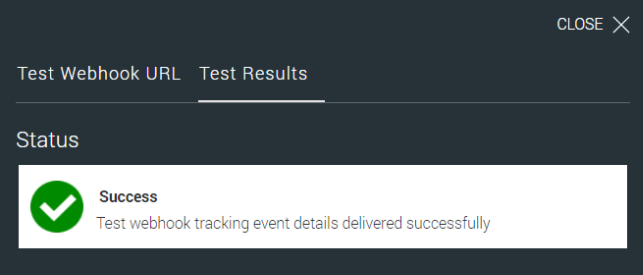
成功示例消息:
成功
测试 Advanced Integrated Visibility 查询事件详情已投递成功。
Status

Success
Test webhook tracking event details delivered successfully

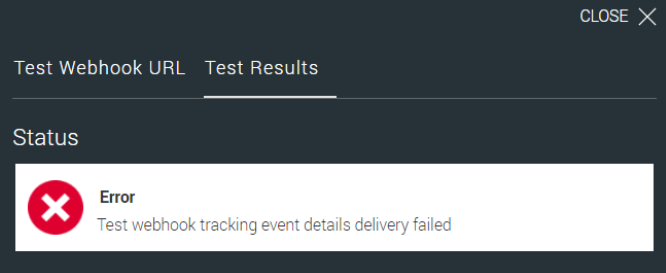
Error
Test webhook tracking event details delivery failed
如果测试事件投递失败,则状态将在测试结果选项卡中显示为错误,并显示相应的错误代码和错误消息。
示例错误消息:
错误代码:<<error code>>
测试 Advanced Integrated Visibility 查询事件详情已投递失败。
验证规则:
- Advanced Integrated Visibility URL 必须符合标准化的语法格式。
- 测试 Advanced Integrated Visibility URL 所需的全部必填字段不能为空。
- 若验证成功:
- FedEx 将发送含示例事件 JSON 的请求。 注意:Advanced Integrated Visibility 目的地 URL 应将 200 (OK) 作为 HTTP 状态码向 FedEx 发出响应。
- 若验证不成功/失败:
- 如果 FedEx 收到的响应不是 200 (OK),则 Advanced Integrated Visibility 目的地 URL 的验证将被视为失败。
- FedEx 将在测试结果选项卡中显示错误代码和错误信息
数据载荷计算器
数据负载计算器旨在帮助订阅用户估算通过 Webhook 活动产生的数据量。该工具可清晰呈现每日负载大小、货件数量及查询事件数量,帮助用户就数据使用量与集成规划做出明智决策。
使用计算器
用户可以输入以下参数:
- 货件数量
- 每个货件的事件数(默认:5)
- 每日负载量(自动计算)
根据这些输入内容,计算器将动态显示:
- 查询事件总数
- 每日负载量
- 预计数据总量
说明事项:
- 每个货件的事件数默认为 5。此数值基于每个货件平均 17–18 个事件,以及 1–7 天的典型递送时长(具体取决于服务类型、承运人及目的地)。假定平均递送时间为 3 天。注意:此值可由用户编辑。
- 每日负载量的计算公式为:货件数量 × 每个货件的事件数(默认值:5)
- 用户只需输入货件数量并点击“计算”即可生成结果。其他数值采用默认值或由系统自动计算。
免责声明:计算器提供的所有数值均为估算值,仅供规划参考。
Number of Shipments
Events per Shipment (default 5)
Daily Payload Volume (events per day)
Note: Displayed values are approximations and may not reflect exact usage metrics.
