


Sandbox Console

測試 Webhook
您可以使用「測試 Webhook 網址」功能,以測試傳回目的地網址 (接收器/接聽程式伺服器) 的追蹤資料類型。此功能可先協助驗證傳回的網址和資料,再建立 Advanced Integrated Visibility Webhook。
導覽:
下列為導覽至「測試 Webhook 網址」沙箱主控台的方法:
- 「我的專案」(位於左側「導覽面板」上) ->「Advanced Integrated Visibility」索引標籤 ->「測試 Webhook 網址」按鈕 -> 在沙箱主控台中,按一下「嘗試此 Advanced Integrated Visibility」
- 「API 目錄」(位於左側「導覽面板」上) -> 搜尋 Advanced Integrated Visibility/按一下「篩選條件」中的「Advanced Integrated Visibility」->「Advanced Integrated Visibility」卡片:
- ->「總覽」->「文件」按鈕 -> 在沙箱主控台中,按一下「嘗試此 Advanced Integrated Visibility」。
- ->「文件」-> 在沙箱主控台中,按一下「嘗試此 Advanced Integrated Visibility」。
步驟:
以下為使用「測試 Webhook 網址」功能的步驟:
- 按一下「測試 Webhook 網址」按鈕。
- 輸入下列測試參數:
資料欄名稱 說明 目的地 URL
此為接收查詢事件資料/承載的 URL。
- 客戶應提供可用且有效的目的地 URL。
- 提供的目的地 URL 必須使用標準化語法格式 (安全 https URL)。
安全性權杖
當作驗證 Advanced Integrated Visibility Webhook 回應的共用密碼。
- 權杖值長度必須至少為 26 個字元,最多 100 個字元。
- 必須至少使用 1 個大寫、1 個小寫及 1 個數字字元。
- 安全性權杖可用於建立回應驗證的雜湊訊息驗證碼 (HMAC) 簽章。
承載語言
請從下拉清單中選取查詢資料翻譯的慣用語言。下列為可用的 6 個範例語言:
- 英文 (美國) (預設)
追蹤類型
請針對須收到的查詢資料選取回應類型。
- 詳細追蹤回應 (回應類型包含受保護的追蹤資料與事件的完整歷程記錄)。(預設)
- 事件專屬追蹤回應 (回應類型包含受保護的追蹤資料與最近期的事件資訊)。(即將推出)
查詢事件
選取一個較高層級的類別,以接收與包裹生命週期中貨件事件相關的電子郵件通知。以下為較高層級的類別:
- 寄件
- 運送中
- 送達
- 例外狀況
- 預估送達日期
狀態事件
包裹生命週期中的查詢事件。選取其中一個要收到的查詢事件。下列為可用的 10 個範例狀態事件:
- 已取件
- 運送中
- 已送達
- 遞送的例外狀況
附註:系統將會根據選取的「查詢事件類別」填入「狀態事件」欄位值。請參閱下列表格,以深入瞭解「查詢事件類別」與其相應「狀態事件」。
狀態活動類別 狀態事件 寄件
- 已取件
運輸中
- 運送中
送達
- 已送達
例外狀況
- 遞送的例外狀況
預估送達日期 (即將推出)
- 預估送達日期 (EDD)
- 預估送達時間範圍 (EDTW)
- 核取「FedEx Developer Portal 授權合約 (FDPLA)」方塊,以簽署/接受該授權合約。
- 按一下「推播」按鈕,以檢視測試結果。
回應:
下列為沙箱中的回應參數:
- Body – 本文包含沙箱主控台「測試 Webhook URL」索引標籤中的回應參數。
- Status – 此「測試結果」索引標籤中的區段可針對您已處理的請求提供狀態。
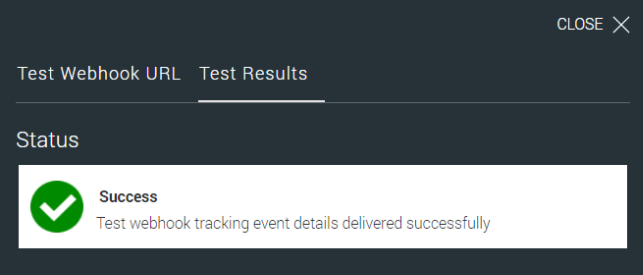
成功訊息範例:
成功
測試 Advanced Integrated Visibility 查詢事件詳細資料已成功傳送。
Status

Success
Test webhook tracking event details delivered successfully

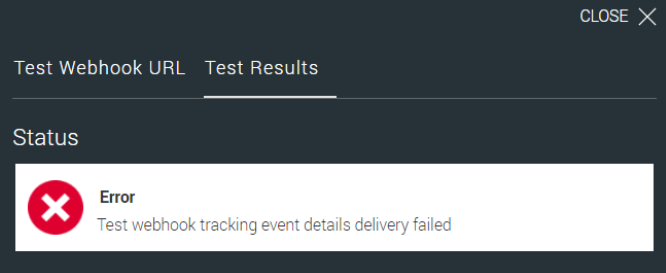
Error
Test webhook tracking event details delivery failed
如果測試事件傳送失敗,測試結果索引標籤中的狀態將會顯示為錯誤,並且會出現相應的錯誤代碼與錯誤訊息。
錯誤訊息範例:
錯誤代碼:<<錯誤代碼>>
測試 Advanced Integrated Visibility 查詢事件詳細資料傳送失敗。
驗證規則:
- Advanced Integrated Visibility 網址必須使用標準化語法格式。
- 所有用於測試 Advanced Integrated Visibility 網址的必填欄位皆不得空白。
- 成功的驗證:
- FedEx 將會傳送隨附範例事件 JSON 的請求。 附註:Advanced Integrated Visibility 目的地網址應會向 FedEx 回應 200 (OK) 作為 HTTP 狀態代碼。
- 未成功/失敗的驗證:
- 如果 FedEx 收到 200 (確定) 以外的任何回應,則 Advanced Integrated Visibility 目的地網址的驗證將視為失敗。
- FedEx 將會在「測試結果」索引標籤中顯示錯誤代碼和錯誤訊息。
資料承載計算機
資料承載計算機用來協助訂閱者估算透過 Webhook 活動產生的資料量。可讓您掌握每日承載大小、貨件數量及追蹤事件量,協助使用者就資料用量與整合規劃做出明智決策。
使用計算機
使用者可輸入下列參數:
- 貨件數量
- 每貨件事件數 (預設:5)
- 每日承載量 (自動計算)
根據這些輸入內容,計算機會動態顯示:
- 追蹤事件總數
- 每日承載
- 預估資料大小總計
說明事項:
- 每貨件事件數預設為 5,根據每貨件平均 17–18 個事件計算,且視服務類型、承運人和目的地而定,送達時間通常為 1–7 天。假設平均送達時間為 3 天。備註:使用者可編輯此值。
- 每日承載量計算方式:貨件數量 × 每貨件事件數 (預設:5)
- 使用者只需要輸入「貨件數量」,然後按一下「計算」,即可產生結果。其他值則為預設或自動計算得出。
免責聲明:計算機提供的所有數值均為近似值,僅供規劃使用。
Number of Shipments
Events per Shipment (default 5)
Daily Payload Volume (events per day)
Note: Displayed values are approximations and may not reflect exact usage metrics.
